
WebUtils
Your utility toolbox - QR generator, color picker, unit converter and more in a sidebar.
As of June 2026, WebUtils has — users in the Productivity category.
Usersno change0%
—
—
Ratingno change0%
—
— reviews
Reviewsno change0%
—
Version
1.0.0
Manifest V3
History
1 snapshotsTracking since Jun 10, 2026.
Not enough history yet for this metric — the chart fills in as we collect more snapshots.
View as table
| Date | Users | Rating | Reviews | Version |
|---|---|---|---|---|
| Jun 10, 2026 | — | — | — | 1.0.0 |
| Now | — | — | — | 1.0.0 |
Permissions & access
- Permissions
- sidePanelstorageclipboardWriteclipboardReadalarmsnotifications
- Host access
- https://api.frankfurter.app/*
Screenshots



About
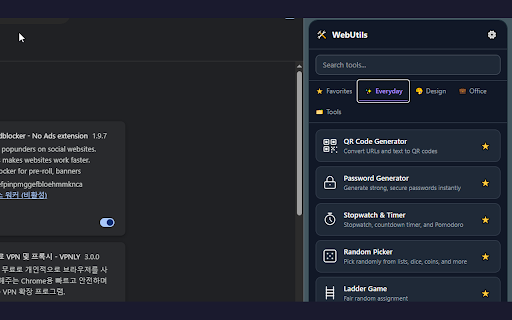
WebUtils brings your favorite utilities into Chrome's Side Panel — always accessible, never in the way.

🛠️ TOOLS INCLUDED

QR Code Generator — Create QR codes from any URL or text. Customize size and colors, download as PNG, or copy to clipboard.

Color Picker — Pick any color from the webpage using the EyeDropper. Instantly get HEX, RGB, and HSL values.

Unit Converter — Convert length, weight, temperature, area, volume, time, data, and live currency rates (30+ currencies via real-time API).

And More — Image Markup, Password Generator, Quick Notes, Emoji Search, Stopwatch & Timer, Date Calculator, VAT Calculator, Palette Generator, Text Tools, Image Resizer, Lotto Generator, Random Picker, Ladder Game, and Time Zone Converter.

✨ WHY WEBUTILS?

Side Panel — Stays open while you browse, no more switching tabs.

Resizable — Compact icon mode when narrow, full UI when wide.

Drag to Reorder — Easily drag and drop to arrange your most-used tools exactly how you want them.

Multilingual — Auto-detects your Chrome language (EN, KO, JA, ZH, ES, FR, DE, PT).

Dark / Light Mode — Follows your system theme.

Privacy-First — No tracking, no ads, no account required.

Free to use. If you find it helpful, a coffee is always appreciated ☕
Technical
- Version
- 1.0.0
- Manifest
- V3
- Size
- 171KiB
- Min Chrome
- 88
- Languages
- 2
- Featured
- No
Metadata
- ID
- ajcofanapdddnjjhhommibpldmcfgfja
- Developer ID
- u0ded18d5c418ee835c7faa39829794e1
- Developer Email
- [email protected]
- Created
- Jun 9, 2026
- Last Updated (Store)
- Jun 9, 2026
- Last Scraped
- Jun 10, 2026
- Website
- —
- Support URL
- —
- Privacy Policy
- http://www.golfriend.shop/web-utils/privacy.html
Data sourced from the Chrome Web Store · last verified Jun 10, 2026.