
Simple Site Block
Block websites with custom messages
As of June 2026, Simple Site Block has 4 users in the Productivity category.
Usersup 300.0 percent+300.0%
4
4
Ratingno change0%
—
— reviews
Reviewsno change0%
—
Version
2.3
Manifest V3
90-day change · In the last 90 days this extension 1 version update.
History
4 snapshotsTracking since Apr 6, 2026.
View as table
| Date | Users | Rating | Reviews | Version |
|---|---|---|---|---|
| Apr 6, 2026 | 1 | — | — | 2.2 |
| Apr 19, 2026 | 2 | — | — | 2.2 |
| May 27, 2026 | 3 | — | — | 2.2 |
| Jun 3, 2026 | 3 | — | — | 2.3 |
| Now | 4 | — | — | 2.3 |
Changelog
- May 27, 2026description
Block user-selected websites and show custom messages instead of the blocked page.
Block unlimited websites with custom messages.

Simple Site Block is a lightweight website blocker for Chrome that helps you stay focused by blocking distracting websites and showing custom reminders instead.

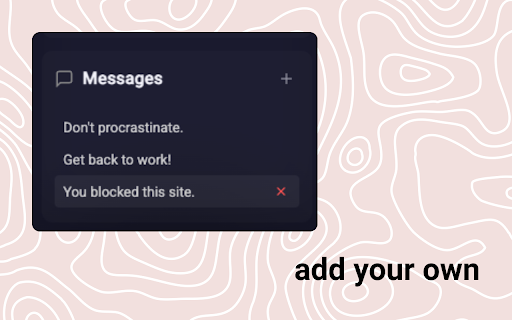
Add any domain to your block list, such as social media, news, video, shopping, or other time-wasting sites. When you try to visit a blocked website, Simple Site Block redirects you to a clean blocked page with focus messages like “Don’t procrastinate,” “Get back to work,” or your own custom reminders. You can add as many sites and reminders as you want. The reminder messages are randomly rotated.

Use Simple Site Block to reduce distractions, build better browsing habits, support deep work, and stay intentional online.

Key features:

- Block websites by domain
- Add and remove blocked sites quickly
- Create custom block messages
- Show a random reminder when a site is blocked
- Simple popup interface
- Lightweight Chrome productivity extension
- No account required
- Built for focus, self-control, and distraction-free browsing

Simple Site Block is useful for students, remote workers, creators, developers, writers, and anyone who wants a simple way to block distracting websites.

Frequently asked questions:

What does Simple Site Block do?
Simple Site Block lets you block websites in Chrome and replace them with custom focus messages.

Can I choose which websites to block?
Yes. You can add specific domains to your blocked site list and remove them anytime.

Can I customize the blocked page message?
Yes. You can add your own motivational or reminder messages.

Is this a productivity extension?
Yes. Simple Site Block is designed as a focus and productivity tool for reducing online distractions.

Keywords: website blocker, site blocker, Chrome website blocker, block distracting websites, productivity extension, focus extension, custom block messages, distraction blocker, simple site blocker, block social media, stay focused Chrome extension
Permissions & access
- Permissions
- storagedeclarativeNetRequest
- Host access
- <all_urls>
Screenshots



About
Block unlimited websites with custom messages.

Simple Site Block is a lightweight website blocker for Chrome that helps you stay focused by blocking distracting websites and showing custom reminders instead.

Add any domain to your block list, such as social media, news, video, shopping, or other time-wasting sites. When you try to visit a blocked website, Simple Site Block redirects you to a clean blocked page with focus messages like “Don’t procrastinate,” “Get back to work,” or your own custom reminders. You can add as many sites and reminders as you want. The reminder messages are randomly rotated.

Use Simple Site Block to reduce distractions, build better browsing habits, support deep work, and stay intentional online.

Key features:

- Block websites by domain
- Add and remove blocked sites quickly
- Create custom block messages
- Show a random reminder when a site is blocked
- Simple popup interface
- Lightweight Chrome productivity extension
- No account required
- Built for focus, self-control, and distraction-free browsing

Simple Site Block is useful for students, remote workers, creators, developers, writers, and anyone who wants a simple way to block distracting websites.

Frequently asked questions:

What does Simple Site Block do?
Simple Site Block lets you block websites in Chrome and replace them with custom focus messages.

Can I choose which websites to block?
Yes. You can add specific domains to your blocked site list and remove them anytime.

Can I customize the blocked page message?
Yes. You can add your own motivational or reminder messages.

Is this a productivity extension?
Yes. Simple Site Block is designed as a focus and productivity tool for reducing online distractions.

Keywords: website blocker, site blocker, Chrome website blocker, block distracting websites, productivity extension, focus extension, custom block messages, distraction blocker, simple site blocker, block social media, stay focused Chrome extension
Technical
- Version
- 2.3
- Manifest
- V3
- Size
- 11.47KiB
- Min Chrome
- 88
- Languages
- 1
- Featured
- No
Metadata
- ID
- aimpkgbobicagmlkgnopapjbdindgbck
- Developer ID
- uc5c99190ef4d819c40b18f8ce20c3fa0
- Developer Email
- [email protected]
- Created
- Feb 25, 2026
- Last Updated (Store)
- May 26, 2026
- Last Scraped
- Jun 8, 2026
- Website
- —
- Support URL
- —
Similar extensions
Alternatives to Simple Site Block, ranked by description similarity.

FocusShield - Stay Productive
Block distracting websites and get AI-powered motivation.
1

WebLock
Block/unblock specified websites from being visited on your browser.
Do not block "\" because it might block everything permanently.
11

Lotus - Site Blocker
Blocks websites to help you focus.
—

LockedIn Site Blocker
Simple website blocker to improve focus and productivity
13
★ 5.0

Blocked!
Block websites and give a justification to remind yourself why you are blocking the website!
—
★ 5.0

URL Blocker
Displays a blocking overlay on pages matching specified URL patterns.
58

Blocker
Blocks sites of your own choosing for free, forever
—

Blocker
Block sites, URL, keywords for focus and parental control.
—
Data sourced from the Chrome Web Store · last verified Jun 8, 2026.