
YouTube → Claude Transcriber
One-click YouTube transcript extraction → Claude summarization
As of June 2026, YouTube → Claude Transcriber has 164 users and a 5.00/5 rating from 2 reviews in the Productivity category.
Usersup 141.2 percent+141.2%
164
164
Ratingno change0%
5.00
2 reviews
Reviewsno change0%
2
Version
1.1.0
Manifest V3
History
8 snapshotsTracking since Apr 6, 2026.
View as table
| Date | Users | Rating | Reviews | Version |
|---|---|---|---|---|
| Apr 6, 2026 | 68 | 5.00 | 2 | 1.1.0 |
| Apr 19, 2026 | 95 | 5.00 | 2 | 1.1.0 |
| Apr 24, 2026 | 119 | 5.00 | 2 | 1.1.0 |
| May 1, 2026 | 128 | 5.00 | 2 | 1.1.0 |
| May 8, 2026 | 124 | 5.00 | 2 | 1.1.0 |
| May 21, 2026 | 136 | 5.00 | 2 | 1.1.0 |
| May 31, 2026 | 148 | 5.00 | 2 | 1.1.0 |
| Jun 8, 2026 | 159 | 5.00 | 2 | 1.1.0 |
| Now | 164 | 5.00 | 2 | 1.1.0 |
Permissions & access
- Permissions
- activeTabstorage
- Host access
- https://www.youtube.com/*, https://claude.ai/*
Screenshots
About
Unlimited use. No subscription, or billing required.

Extract YouTube transcripts in one click and send them to Claude for instant AI-powered summaries, notes, and analysis. Works in Claude free or paid versions.

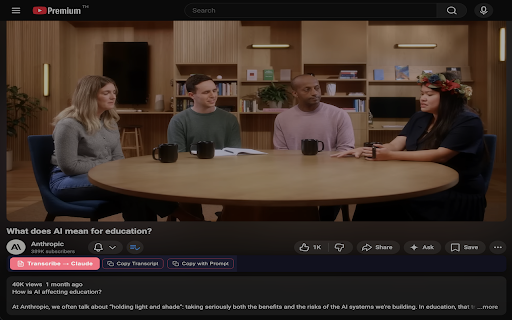
One click. Full transcript to clipboard or into instant Claude analysis and conversation, with one-click follow-up prompts to keep the conversation going.

YouTube → Claude Transcriber extracts video captions directly from YouTube and sends them to Claude.ai with your custom prompt — turning any video into structured notes, summaries, or study material in seconds.

Why only Claude?
The author of this extension found Claude the most useful and versatile model with the ability to create 'artefacts' that can be easily copy/pasted to your own note taking app (Notion, Obsidian, Apple Notes etc.) The default prompt asks Claude to format in Markdown (.md) format for easy export.

There are other extensions available for Gemini, chatGPT etc. - this one is for Claude.

✨ Key Features:

• One-Click Transcription — Click the widget below any YouTube video to extract its transcript and open Claude with your prompt pre-loaded
• Thumbnail Quick-Action — Hover over any video thumbnail on YouTube to transcribe without even opening the video
• Custom Prompts — Fully customizable main prompt and up to 5 follow-up prompts. Use variables ${title}, ${transcript}, and ${url}
• Follow-Up Widget — After transcription, a floating widget appears on Claude with your favorite follow-up prompts for deeper analysis
• Copy Options — Copy just the transcript or the full prompt+transcript to your clipboard
• Keyboard Shortcut — Trigger transcription with Alt+T (customizable)
• Language Support — Auto-detects caption language or lets you set a preferred language
• Timestamps — Optionally include timestamps in the transcript
• Dark Theme — Sleek dark UI that blends naturally with YouTube

🔒 Privacy First:

• No data collection, no analytics, no tracking
• Captions are fetched directly from YouTube's servers
• Data only goes to Claude when you explicitly click the button
• All preferences stored locally in your browser

How It Works:

1. Navigate to any YouTube video with captions
2. Click "Transcribe → Claude" below the video title
3. Claude opens with the full transcript and your custom prompt
4. Get instant summaries, notes, or analysis

Perfect for students, researchers, content creators, and anyone who learns from YouTube.
Technical
- Version
- 1.1.0
- Manifest
- V3
- Size
- 45.57KiB
- Min Chrome
- 88
- Languages
- 1
- Featured
- No
Metadata
- ID
- ahpgnigecmajdggfecogimmdlmlchgko
- Developer ID
- ue54bac9e31846f11039a3b71642b4018
- Developer Email
- [email protected]
- Created
- Feb 11, 2026
- Last Updated (Store)
- Feb 11, 2026
- Last Scraped
- Jun 8, 2026
- Website
- —
Similar extensions
Alternatives to YouTube → Claude Transcriber, ranked by description similarity.

YouTube Subtitle Extractor
Copy YouTube transcripts and send them to ChatGPT or Claude.
79
★ 5.0

Extract YouTube Transcripts + Summarize in a New AI Tab
ver1.5 UPDATE - NOW SUPPORTS Grok(xAI)!
Instantly send YouTube transcripts to ChatGPT, Gemini, Claude, or Grok for summarization.…
29
★ 5.0

Copy YouTube Transcript
One-click copy YouTube transcripts
6

QuickTube – YouTube Transcript to Text & AI Summary
Fetch, copy & download YouTube transcripts as plain text. Copy a summary prompt + transcript, then open ChatGPT, Gemini, or Claude.
27

YouTube Transcript & AI Summary Generator – Powered by ChatGPT
Transcribe YouTube videos and create AI-powered summaries. Simple, accurate, and free.
216
★ 3.0

Copy Youtube Transcript
Copy YouTube video transcripts with one click.
20.0K
★ 4.7
YouTube Summary with ChatGPT & Claude
Summarize YouTube videos, web articles, and PDFs to save time, powered by ChatGPT, Claude, Mistral AI, and Gemini.
2.0M
★ 4.3

YouTube Summary
Quickly summarize YouTube videos using ChatGPT, Claude, Grok, Gemini, or DeepSeek
9
★ 1.0
Data sourced from the Chrome Web Store · last verified Jun 8, 2026.