
Note Taker- Natty
Notes taker. Evernotes free alternative. With Complete Privacy. Natty- Your Personal Listener
As of May 2026, Note Taker- Natty has 33 users and a 5.00/5 rating from 1 reviews in the Workflow & Planning category.
Usersdown 8.3 percent−8.3%
33
33
Ratingno change0%
5.00
1 reviews
Reviewsno change0%
1
Version
1.1
Manifest V3
History
2 snapshotsTracking since Apr 25, 2026.
View as table
| Date | Users | Rating | Reviews | Version |
|---|---|---|---|---|
| Apr 25, 2026 | 36 | 5.00 | 1 | 1.1 |
| May 22, 2026 | 30 | 5.00 | 1 | 1.1 |
| Now | 33 | 5.00 | 1 | 1.1 |
Permissions & access
- Permissions
- storagedownloadsactiveTab
- Host access
- None declared
Screenshots


About
Natty is your ultimate note-taking companion right in your Chrome browser. Designed for simplicity and efficiency, Natty allows you to quickly jot down and manage your notes without leaving your current tab. Whether you're brainstorming ideas, making a to-do list, or just need to save a quick reminder, Natty has got you covered.

Key Features:
Text Editor: A clean and user-friendly text editor to write your notes effortlessly.
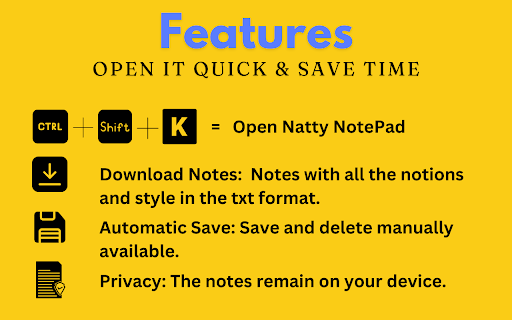
Privacy: Your notes remain on your device, ensuring your privacy and security.
Shortcut: Quickly create a new note using Ctrl + Shift + K.
Multiple Notes: Manage multiple notes seamlessly within the extension.
Download Notes: Download your notes for offline access and backup.
Dark Mode and Light Mode: Switch between dark mode and light mode to suit your preference.
Search Notes: Easily find specific notes using the powerful search functionality.
Highlight Search Results: Highlight keywords in your notes for easy reference.
Automatic Save: Your notes are automatically saved as you type, so you never lose your work.
Save and Delete Notes: Effortlessly save new notes and delete unwanted ones.
Quick Notes: Open a new note instantly by clicking on the Natty icon in the Chrome toolbar.
How to Use:
Create a New Note: Press Ctrl + Shift + K to open a new note window.
Manage Notes: Access and manage all your notes through the Natty extension icon in the Chrome toolbar.
Switch Modes: Toggle between dark mode and light mode in the settings.
Search and Highlight: Use the search bar to find and highlight specific notes.
Save and Delete: Save new notes automatically or delete unwanted ones with ease.
Installation:
Installing Natty is quick and easy:

Go to the Chrome Web Store and search for "Natty - A Note Taker Chrome Extension".
Click "Add to Chrome" and follow the prompts to add the extension to your browser.
Once installed, you can access Natty directly from the Chrome toolbar without any additional setup.
Support:
If you encounter any issues or have any questions, please contact us at: [email protected]

Privacy:
Natty values your privacy. All notes are stored locally on your device and are never shared with any third parties.


Stay organized and boost your productivity with Natty, your go-to note-taking tool in Chrome. Download now from the Chrome Web Store and experience the simplicity and efficiency of seamless note-taking!
Technical
- Version
- 1.1
- Manifest
- V3
- Size
- 614KiB
- Min Chrome
- 88
- Languages
- 1
- Featured
- No
Metadata
- ID
- ahoilbhkfemokhpbpjamibhdfiddmocg
- Developer ID
- ue3a155441f17187eb23a7446eff392b9
- Developer Email
- [email protected]
- Created
- Jun 24, 2024
- Last Updated (Store)
- Aug 12, 2024
- Last Scraped
- May 22, 2026
- Website
- trynatty.fun
- Support URL
- https://track.shotcut.in/home/contact/
- Privacy Policy
- https://trynatty.fun/privacy-policy/
Similar extensions
Alternatives to Note Taker- Natty, ranked by description similarity.

Notes Online
The in-page notepad for taking notes online directly on any web page. No login, autosave, 1-click install, and full privacy
5.0K
★ 4.3

Quick Notes
A simple note-taking app for Chrome
20

Quick Notes
Take and organize notes while browsing
4

Quick Notes – Minimalist Notepad & Sticky Notes
The fastest, most private way to take notes in Chrome. Instant access, auto-save, and 100% local storage. No accounts needed.
37
★ 5.0

Web Notes
Add customizable sticky notes to any webpage!
21

Quick Notes
Take and manage notes on your browser
28
★ 4.7
Quick Notes
Create and check notes quickly
2.0K
★ 4.0

TabNotes: Per-Tab Notepad for Productivity
Take notes tied to each browser tab. Perfect for remote work, study, and freelancing.
13
★ 5.0
Data sourced from the Chrome Web Store · last verified May 22, 2026.