
Simple Shortcuts
Simple Chrome extension that adds useful shortcuts.
As of June 2026, Simple Shortcuts has 10 users in the Functionality & UI category.
Usersup 100.0 percent+100.0%
10
10
Ratingno change0%
—
— reviews
Reviewsno change0%
—
Version
0.4.1
Manifest V3
90-day change · In the last 90 days this extension 1 version update.
History
9 snapshotsTracking since Apr 18, 2026.
View as table
| Date | Users | Rating | Reviews | Version |
|---|---|---|---|---|
| Apr 18, 2026 | 5 | — | — | 0.4.0 |
| May 8, 2026 | 9 | — | — | 0.4.0 |
| May 15, 2026 | 7 | — | — | 0.4.1 |
| May 19, 2026 | 6 | — | — | 0.4.1 |
| May 24, 2026 | 7 | — | — | 0.4.1 |
| May 29, 2026 | 10 | — | — | 0.4.1 |
| Jun 3, 2026 | 8 | — | — | 0.4.1 |
| Jun 7, 2026 | 9 | — | — | 0.4.1 |
| Jun 12, 2026 | 8 | — | — | 0.4.1 |
| Now | 10 | — | — | 0.4.1 |
Permissions & access
- Permissions
- tabsstoragetabGroupsactiveTabscripting
- Host access
- None declared
Screenshots
About
Open-source: https://github.com/DovieW/simple-shortcuts

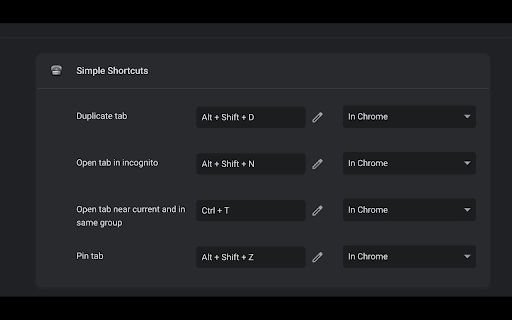
Currently adds these shortcuts with these default/suggested keymaps:
- Duplicate tab(s):                                                      Alt + Shift + D
- Open tab(s) in incognito:                                        Alt + Shift + N
- Pin tab(s):                                                                 Alt + Shift + Z
- Open new tab near current and in same group:  Ctrl + E
- Open new tab at the end of the current group:    Ctrl + Shift + G
- Open new tab at the end of all tabs:                     Ctrl + Shift + E
- Move tab(s) right:                                                     Alt + Shift + Right (or L)
- Move tab(s) left:                                                       Alt + Shift + Left (or H)
- Move tab(s) to start:                                                Alt + Shift + Up (or K)
- Move tab(s) to end:                                                  Alt + Shift + Down (or J)
- Switch to last active tab:                                         Alt + A
- Cycle windows:                                                         Alt + Shift + A
- Move tab(s) to different window:                            Ctrl + Shift A
- Toggle collapse all groups:                                     Ctrl + G
- Move all groups to front/back:                               Alt + Shift + G
- Copy current tab URL to clipboard:                        Ctrl + Shift + C
- Go to home page of site:                                         Ctrl + Shift + H
```

After extension is installed, tabs may have to be reloaded.
Technical
- Version
- 0.4.1
- Manifest
- V3
- Size
- 832KiB
- Min Chrome
- 88
- Languages
- 1
- Featured
- Yes
Metadata
- ID
- ahocokogjkjpkdjaobcjjdnmmlhpcapn
- Developer ID
- ua3da5f111df4e017e2ef1871818c2e23
- Developer Email
- [email protected]
- Created
- Dec 26, 2023
- Last Updated (Store)
- Apr 30, 2026
- Last Scraped
- Jun 12, 2026
- Website
- —
- Privacy Policy
- —
Similar extensions
Alternatives to Simple Shortcuts, ranked by description similarity.

Tab Duplicator
Duplicate the current tab using customizable keyboard shortcuts
7
★ 5.0

Tab Shortcuts
Provides keyboard shortcuts for managing tabs.
8
★ 5.0

Chrome Power Shortcuts
Lets you duplicate, pin and close other tabs with shortcuts.
20

PowerTabs - Tab Switcher
Quick tab switcher with keyboard shortcuts, search across tabs, recently closed tabs, history, and bookmarks
31

Tmux Tab Groups
Tmux-inspired tab group navigation
6
★ 1.0

Unlimited Chrome Shortcuts
A Chrome extension that allows more than the default amount of 10 shortcuts.
1.0K
★ 3.7

Shortcut Sidebar
Access a variety of keyboard shortcuts from a sidebar. Ideal for tablet mode users.
8

Website Hotkey
Quickly open websites with custom keyboard shortcuts
52
Data sourced from the Chrome Web Store · last verified Jun 12, 2026.