
DOM Key
Links DOM elements to keyboard shortcuts for quick access.
As of June 2026, DOM Key has 16 users and a 4.50/5 rating from 2 reviews in the Productivity category.
Usersup 45.5 percent+45.5%
16
16
Ratingno change0%
4.50
2 reviews
Reviewsno change0%
2
Version
0.1.0
Manifest V3
History
5 snapshotsTracking since Apr 19, 2026.
View as table
| Date | Users | Rating | Reviews | Version |
|---|---|---|---|---|
| Apr 19, 2026 | 11 | 4.50 | 2 | 0.1.0 |
| May 4, 2026 | 13 | 4.50 | 2 | 0.1.0 |
| May 13, 2026 | 14 | 4.50 | 2 | 0.1.0 |
| May 25, 2026 | 15 | 4.50 | 2 | 0.1.0 |
| Jun 7, 2026 | 12 | 4.50 | 2 | 0.1.0 |
| Now | 16 | 4.50 | 2 | 0.1.0 |
Permissions & access
- Permissions
- activeTabstorage
- Host access
- <all_urls>
Screenshots

About
⚡ DomKey – Lightweight Automation for Simple DOM Actions

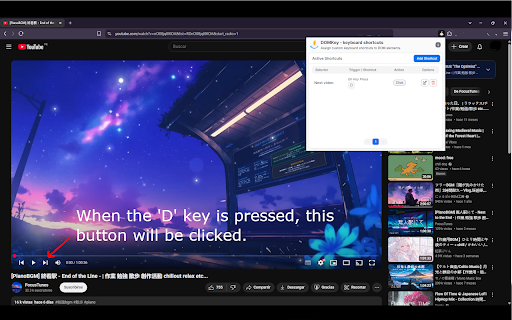
DomKey is a lightweight, no-frills Chrome extension that helps you automate simple actions on any website — no complex tools or coding required.

What can you do?
1. Select a DOM element using a CSS selector.
2. Choose an action: click the element or copy its text/value.
3. Set a trigger:
  - On key press: run the action with a custom keyboard shortcut (e.g. Ctrl+Shift+M).
 - On page load: automatically execute the action when the page finishes loading.

🎯 Designed for simple workflows, DomKey is ideal for users who want to automate basic, repetitive tasks without the overhead of full-scale automation platforms.

🚀 Fast, lightweight, and focused, DomKey is perfect for clicking buttons, extracting data, or triggering quick actions — all with minimal setup.
Technical
- Version
- 0.1.0
- Manifest
- V3
- Size
- 214KiB
- Min Chrome
- 88
- Languages
- 1
- Featured
- No
Metadata
- ID
- ahmiimnmeomahnaomobdipgfbkkgochp
- Developer ID
- u1959f70b57a3890dc89686fcc7c1c9a7
- Developer Email
- [email protected]
- Created
- Jun 22, 2025
- Last Updated (Store)
- Jun 22, 2025
- Last Scraped
- Jun 7, 2026
- Website
- —
- Support URL
- —
- Privacy Policy
- —
Similar extensions
Alternatives to DOM Key, ranked by description similarity.

Action Replay
Automate browser interactions by recording and replaying user actions.
5.0K
★ 4.4

TapClick
Easily trigger web elements using left and right arrow keys for hands-free navigation.
14

Auto Clicker
Automatically click on selected elements at specified intervals
618
★ 2.8

Auto Clicker
Chrome extension to automate clicks with customizable keyboard shortcut
1.0K
★ 4.3

KeyBinds - Keyboard Shortcuts for Web Pages
Create custom keyboard shortcuts for any button, link, or clickable element on web pages.
109
★ 4.0

Testdom.io Flow Recorder
Record and test user flows visually on Testdom.io.
7

Autoclicker
Automate clicking at specified coordinates with configurable intervals
815
★ 3.6

DOM Doctor Pro
Advanced XPath and CSS selector generator with iframe detection, relationship XPath generator, and interaction flow recording
38
Data sourced from the Chrome Web Store · last verified Jun 7, 2026.