
Edit Pager
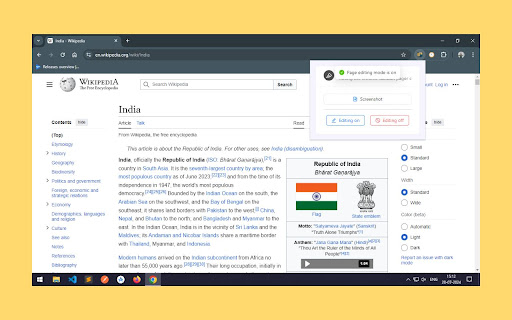
Edit web pages directly within the Chrome tab and capture screenshots effortlessly with this extension.
As of June 2026, Edit Pager has 14 users and a 5.00/5 rating from 2 reviews in the art category.
Usersno change0%
14
14
Ratingno change0%
5.00
2 reviews
Reviewsno change0%
2
Version
1.0.1
Manifest V3
History
2 snapshotsTracking since May 3, 2026.
View as table
| Date | Users | Rating | Reviews | Version |
|---|---|---|---|---|
| May 3, 2026 | 14 | 5.00 | 2 | 1.0.1 |
| Jun 2, 2026 | 13 | 5.00 | 2 | 1.0.1 |
| Now | 14 | 5.00 | 2 | 1.0.1 |
Permissions & access
- Permissions
- scriptingactiveTabtabsdownloads
- Host access
- None declared
Screenshots



About
Unlock a new level of web interaction with EditPager, the ultimate Chrome extension for on-the-fly webpage editing and capturing! Whether you're a designer, developer, or just looking to make quick tweaks, EditPager empowers you to:

Edit Web Pages Directly: Make real-time changes to any webpage's text, images, and styles right within your Chrome tab. See your edits instantly and refine your content as you go.
Take Instant Screenshots: Capture high-quality screenshots of your edited pages or the entire webpage with just a click. Perfect for documenting changes or sharing your work with others.
With a user-friendly interface and powerful editing tools, EditPager makes webpage customization and capture effortless. Try it today and transform the way you interact with the web!
Technical
- Version
- 1.0.1
- Manifest
- V3
- Size
- 246KiB
- Min Chrome
- 88
- Languages
- 1
- Featured
- No
Metadata
- ID
- ahenpbhapchijoohlpokgnadekbmdlko
- Developer ID
- ube91f5f31eab8909b7ea7aaac8f70ac7
- Developer Email
- [email protected]
- Created
- Jul 28, 2024
- Last Updated (Store)
- Aug 2, 2024
- Last Scraped
- Jun 2, 2026
- Website
- —
- Support URL
- —
Similar extensions
Alternatives to Edit Pager, ranked by description similarity.

Screenshot Editor Pro
Capture & edit screenshots with visible page, select area, and full page modes
13

Screenshot Extension
Capture a screenshot of the visible webpage area.
7

Manipulate!
Select the text you want to change, right-click the selection, choose 'Manipulate!' to edit. Test text changes or fool friends!
11
★ 5.0

SidePen - Web Page Annotation
Add annotations (red pen, arrows, sticky notes) directly to web pages.
23

PostSpark - Beautiful Screenshots & Mockups
Create beautiful screenshots and mockups for social media and marketing needs.
2.0K
★ 4.7

PenIsFun
Draw, erase, and annotate on any web page!
27
★ 4.7

Image Download
Quickly download images (including embedded SVGs) from any web page to boost your creative workflow.
192
★ 5.0

Image Extractor
Use the image extractor extension to download images from websites and capture background pictures with this photo downloader.
40.0K
★ 4.5
Data sourced from the Chrome Web Store · last verified Jun 2, 2026.