
Younet: Personalized AI to write & respond
Write & Respond Anywhere with Personalized AI model.
As of June 2026, Younet: Personalized AI to write & respond has 164 users and a 5.00/5 rating from 4 reviews in the Communication category.
Communication★ Featured
Usersup 5.8 percent+5.8%
164
164
Ratingno change0%
5.00
4 reviews
Reviewsno change0%
4
Version
0.1.763
Manifest V3
History
11 snapshotsTracking since Apr 1, 2026.
View as table
| Date | Users | Rating | Reviews | Version |
|---|---|---|---|---|
| Apr 1, 2026 | 155 | 5.00 | 4 | 0.1.763 |
| May 3, 2026 | 167 | 5.00 | 4 | 0.1.763 |
| May 8, 2026 | 171 | 5.00 | 4 | 0.1.763 |
| May 11, 2026 | 165 | 5.00 | 4 | 0.1.763 |
| May 15, 2026 | 163 | 5.00 | 4 | 0.1.763 |
| May 19, 2026 | 170 | 5.00 | 4 | 0.1.763 |
| May 24, 2026 | 174 | 5.00 | 4 | 0.1.763 |
| May 29, 2026 | 168 | 5.00 | 4 | 0.1.763 |
| Jun 3, 2026 | 170 | 5.00 | 4 | 0.1.763 |
| Jun 7, 2026 | 159 | 5.00 | 4 | 0.1.763 |
| Jun 12, 2026 | 162 | 5.00 | 4 | 0.1.763 |
| Now | 164 | 5.00 | 4 | 0.1.763 |
Permissions & access
- Permissions
- storagecontextMenustabs
- Host access
- *://*.younet.ai/*
Screenshots


About
Introducing Younet chrome extension, a personalized copilot anywhere you need to write or respond!

➤ What is it?
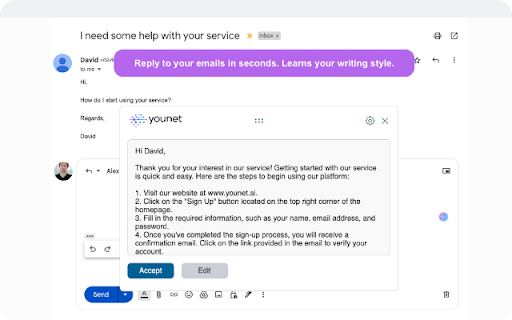
Younet is a personalized AI technology that empowers you to write or respond contextually relevant drafts, responses, ideas, and more instantly across any CRM, Email, Text Form, Google Docs, Help Desk, and various other platforms.

With this extension you may connect your created AI model and always have it by your side. You'll have the ultimate assistant to tackle complex questions and tasks. Whether you need help writing emails, reading articles, or conducting smart searches, Younet AI is here to assist you.

➤ How to start?
Here are some quick start tips:

1. Install the extension and click on it to Login.

2. Once you logged-in, you can now use @younet command to activate extension, the simply ask what you need to write.

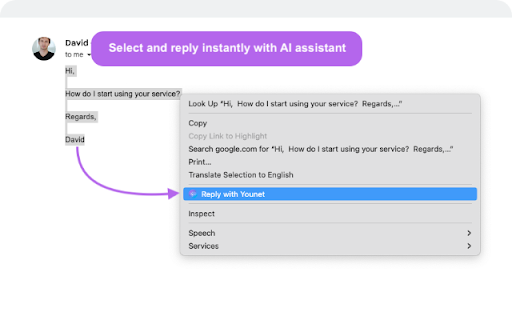
3. Select any text or a question on the page you want to receive a response and click Reply with Younet or right mouse click then Reply with Younet.

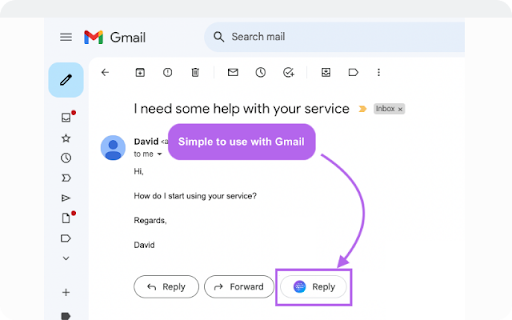
4. In Gmail it’s fully integrated to use native buttons directly in the email to respond.

Experience the power or AI, and take your productivity to new heights. Get started today!

➤ Is it free to use?
Yes, current version of Chrome extension and all capabilities of the platform are free to use but require approval by Younet.

➤ Terms and Conditions
By installing the extension, you agree to and acknowledge:
www.younet.ai/terms-and-conditions
www.younet.ai/terms-and-conditions#privacy-policy
Technical
- Version
- 0.1.763
- Manifest
- V3
- Size
- 493KiB
- Min Chrome
- 88
- Languages
- 1
- Featured
- Yes
Metadata
- ID
- ahabdciobjaamioehoaifaoabkimhegj
- Developer ID
- u8cf6f34d17f0c0b5607ba5bbf33ca548
- Developer Email
- [email protected]
- Created
- Aug 9, 2023
- Last Updated (Store)
- Apr 2, 2026
- Last Scraped
- Jun 12, 2026
- Website
- younet.ai
- Support URL
- https://support.younet.ai/
- Privacy Policy
- https://younet.ai/terms-and-conditions
Similar extensions
Alternatives to Younet: Personalized AI to write & respond, ranked by description similarity.

SuggestMe AI - Free Reply Generator
Free AI reply generator for emails and chats. Write faster on any website.
5

TryToReply
Your personal AI auto responder
1

AI Comment Buddy
An AI-powered extension that helps users generate thoughtful and engaging comments and replies on social media platforms.
2
★ 5.0

ChatGPT for Gmail by cloudHQ
Automatically write emails using ChatGPT for Gmail
30.0K
★ 4.4

AI Email Helper
Gmail assistant that generates responses using OpenAI Assistant API
3

AI Message Response Generator - by AIFreeBox
Generate message responses with AI. Turn ideas into professional replies in seconds. Create responses directly in your browser.
15

ProMessage AI
Generate smart AI-powered replies, refine drafts, and boost your messaging on LinkedIn, WhatsApp, Facebook, and more.
7
★ 5.0

SmartReply+
AI-powered Gmail reply generator using Gemini AI. One click, smart reply.
5
★ 5.0
Data sourced from the Chrome Web Store · last verified Jun 12, 2026.