
Prompt Optimizer
Refine AI prompts in-page or in a popup. Gemini, OpenAI, or local Ollama. Templates, secure keys, side-by-side preview.
As of June 2026, Prompt Optimizer has 160 users in the Productivity category.
Usersup 175.9 percent+175.9%
160
160
Ratingno change0%
—
— reviews
Reviewsno change0%
—
Version
1.1.2
Manifest V3
90-day change · In the last 90 days this extension 1 version update, changed permissions.
History
7 snapshotsTracking since Apr 1, 2026.
View as table
| Date | Users | Rating | Reviews | Version |
|---|---|---|---|---|
| Apr 1, 2026 | 58 | — | — | 1.0.0 |
| Apr 19, 2026 | 61 | — | — | 1.0.0 |
| Apr 29, 2026 | 91 | — | — | 1.0.0 |
| May 8, 2026 | 99 | — | — | 1.0.0 |
| May 21, 2026 | 120 | — | — | 1.0.0 |
| Jun 4, 2026 | 145 | — | — | 1.0.0 |
| Jun 9, 2026 | 151 | — | — | 1.1.2 |
| Now | 160 | — | — | 1.1.2 |
Changelog
- Jun 4, 2026description
Supercharge your AI interactions with Prompt Optimizer, the ultimate browser extension for refining your prompts for Google Gemini and OpenAI's GPT models. Whether you're a developer, writer, or enthusiast, this tool helps you craft clearer, more effective prompts to get the best possible results from large language models.

KEY FEATURES:

✔️ In-Page Floating Toolbar: Don't break your flow. Simply select text in any textarea or input field on any website, and a context-aware toolbar appears with powerful, one-click optimization suggestions.

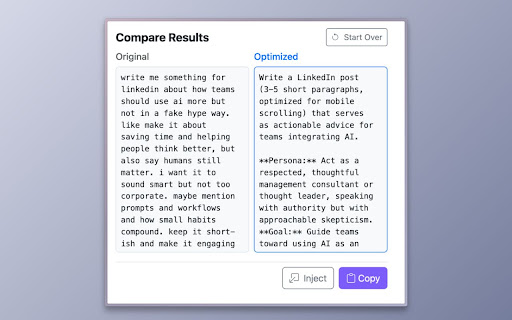
✔️ Popup Prompt Pad: Use the extension popup as your dedicated prompt engineering scratchpad. Write, paste, and iteratively refine your ideas with a full suite of tools. Compare the original and optimized versions side-by-side to see the improvement instantly.

✔️ Advanced Prompt Engineering: The suggestion "pills" are more than just simple commands. They are powered by sophisticated meta-prompts designed to elicit high-quality, structured responses from AI, incorporating best practices like persona assignment, clear constraints, and logical structure.

✔️ Multi-Provider Support: Bring your own API keys for Google Gemini or OpenAI. Your keys are stored securely in your browser's local storage and are never transmitted to our servers.

✔️  Guest Mode: Want to try it out first? Use Guest Mode for a limited number of free daily prompt optimizations without needing an API key.

✔️ Secure & Private: We prioritize your security. API keys are handled exclusively in the background, never exposed to web pages. For an extra layer of security, enable AES-256 encryption with your own passphrase.

Stop getting mediocre results from your AI. Install Prompt Optimizer and start crafting expert-level prompts today!
Optimize your prompts for AI models like Gemini, GPT, and local Ollama.

Prompt Optimizer is a Chrome extension that helps you craft clearer, more effective prompts for large language models—without leaving the page you're on.

What's new in 1.1.0

• Workspace UI refresh for popup, options, and in-page preview
• Custom prompt templates (toolbar / popup / both)
• Text template library with in-page trigger expansion
• Ollama (local) provider — run optimizations against your own machine
• Improved built-in optimization pills and popup quick actions

Important: Guest Mode has been removed. If you previously used Guest Mode, open Options and set up Gemini, OpenAI, or Ollama (Local). Your other settings are kept after the update.

KEY FEATURES

• In-page floating toolbar — Select text in a textarea, input, or contenteditable field on any site. A compact toolbar appears with one-click optimization actions.

• Popup Prompt Workspace — Open the extension popup to write, paste, and refine longer prompts. Compare original and optimized text side by side before you apply changes.

• Advanced prompt engineering — Built-in suggestion pills use structured meta-prompts (persona, constraints, format) so models return higher-quality results—not generic rewrites.

• Custom optimization templates — Save your own instruction templates in Options and show them on the toolbar, popup, or both.

• Text template library — Store reusable snippets with triggers (e.g. ;;po:meeting) and expand them in-page while you type.

• Multi-provider support — Use your own API keys for Google Gemini or OpenAI, or connect to a local Ollama server for private, on-device optimization.

• Secure and private — API keys stay in your browser (chrome.storage.local). Keys are only used in the background service worker to call your chosen provider. Optional AES-GCM encryption with a passphrase you control.

• Local storage — Settings and libraries stay on your device, not in our cloud. Export text templates from Options (JSON/CSV) if you want your own backup before uninstalling or switching browsers.

• Themes — Light, dark, or system appearance across popup, options, and in-page UI.

GETTING STARTED

1. Install the extension and open Options.
2. Choose Gemini, OpenAI, or Ollama (Local) and configure your provider.
3. Select text on any site or use the popup to optimize.
4. Enter the special prefix to insert custom snippets.
- Jun 4, 2026short_description
Optimize your prompts for AI models like Gemini and GPT.
Refine AI prompts in-page or in a popup. Gemini, OpenAI, or local Ollama. Templates, secure keys, side-by-side preview.
- Jun 4, 2026host_permissions
(empty)
http://127.0.0.1:11434/*, http://localhost:11434/*
Permissions & access
- Permissions
- storagescriptingactiveTab
- Host access
- http://127.0.0.1:11434/*, http://localhost:11434/*
Screenshots



About
Optimize your prompts for AI models like Gemini, GPT, and local Ollama.

Prompt Optimizer is a Chrome extension that helps you craft clearer, more effective prompts for large language models—without leaving the page you're on.

What's new in 1.1.0

• Workspace UI refresh for popup, options, and in-page preview
• Custom prompt templates (toolbar / popup / both)
• Text template library with in-page trigger expansion
• Ollama (local) provider — run optimizations against your own machine
• Improved built-in optimization pills and popup quick actions

Important: Guest Mode has been removed. If you previously used Guest Mode, open Options and set up Gemini, OpenAI, or Ollama (Local). Your other settings are kept after the update.

KEY FEATURES

• In-page floating toolbar — Select text in a textarea, input, or contenteditable field on any site. A compact toolbar appears with one-click optimization actions.

• Popup Prompt Workspace — Open the extension popup to write, paste, and refine longer prompts. Compare original and optimized text side by side before you apply changes.

• Advanced prompt engineering — Built-in suggestion pills use structured meta-prompts (persona, constraints, format) so models return higher-quality results—not generic rewrites.

• Custom optimization templates — Save your own instruction templates in Options and show them on the toolbar, popup, or both.

• Text template library — Store reusable snippets with triggers (e.g. ;;po:meeting) and expand them in-page while you type.

• Multi-provider support — Use your own API keys for Google Gemini or OpenAI, or connect to a local Ollama server for private, on-device optimization.

• Secure and private — API keys stay in your browser (chrome.storage.local). Keys are only used in the background service worker to call your chosen provider. Optional AES-GCM encryption with a passphrase you control.

• Local storage — Settings and libraries stay on your device, not in our cloud. Export text templates from Options (JSON/CSV) if you want your own backup before uninstalling or switching browsers.

• Themes — Light, dark, or system appearance across popup, options, and in-page UI.

GETTING STARTED

1. Install the extension and open Options.
2. Choose Gemini, OpenAI, or Ollama (Local) and configure your provider.
3. Select text on any site or use the popup to optimize.
4. Enter the special prefix to insert custom snippets.
Technical
- Version
- 1.1.2
- Manifest
- V3
- Size
- 571KiB
- Min Chrome
- 88
- Languages
- 1
- Featured
- No
Metadata
- ID
- agppepokoppdohhdfbkonfalcjbggomm
- Developer ID
- ubef6f27a37378ac4309345f247c17ef8
- Developer Email
- [email protected]
- Created
- Nov 5, 2025
- Last Updated (Store)
- May 28, 2026
- Last Scraped
- Jun 9, 2026
- Website
- thehelpfultipper.com
- Support URL
- —
Similar extensions
Alternatives to Prompt Optimizer, ranked by description similarity.

AI Prompt Optimizer
Transform basic requests into optimized prompts for Gemini, GPT-4, Claude & more with intelligent enhancement.
29
★ 5.0

AI Prompt Optimizer
Unleash AI power! Optimize prompts for ChatGPT, Claude, Grok, Gemini & more. Boost conversations instantly.
849
★ 3.0

PromptPro: AI Prompt Enhancer - Improve Prompts for ChatGPT, Claude, Gemini
Prompt enhancer for ChatGPT, Claude, and Gemini. Instantly optimize AI prompts for better results.
255
★ 5.0

Prompt Optimizer
Optimizes prompts for large language models.
11

Better Prompt - AI-powered prompt enhancer
Turn rough ideas into detailed prompts with one click. Works on ChatGPT, Claude, Perplexity, DeepSeek & almost any Ai website.
2

Prompt Engineer Pro
Rewrites rough prompts into optimized, best-practice prompts for AI models. Opens in a side panel beside ChatGPT.
15
★ 5.0

Prompt Booster
Boost your prompts with AI-powered optimization for more effective interactions with AI language models.
62
★ 4.0

Prompt Enhancer
Enhance and craft AI prompts with Gemini Nano — chat, edit, and copy on ChatGPT, Gemini, Claude, and Perplexity
32
★ 5.0
Data sourced from the Chrome Web Store · last verified Jun 9, 2026.