
Memorable Password Generator
Generate memorable passwords in one click
As of June 2026, Memorable Password Generator has 494 users and a 4.80/5 rating from 5 reviews in the Workflow & Planning category.
Usersup 17.1 percent+17.1%
494
494
Ratingup 1.1 percent+1.1%
4.80
5 reviews
Reviewsup 25.0 percent+25.0%
5
Version
1.1.2
Manifest V3
History
15 snapshotsTracking since Apr 1, 2026.
View as table
| Date | Users | Rating | Reviews | Version |
|---|---|---|---|---|
| Apr 1, 2026 | 422 | 4.75 | 4 | 1.1.2 |
| Apr 16, 2026 | 440 | 4.75 | 4 | 1.1.2 |
| Apr 22, 2026 | 456 | 4.75 | 4 | 1.1.2 |
| Apr 27, 2026 | 471 | 4.75 | 4 | 1.1.2 |
| May 2, 2026 | 469 | 4.75 | 4 | 1.1.2 |
| May 7, 2026 | 473 | 4.75 | 4 | 1.1.2 |
| May 11, 2026 | 474 | 4.75 | 4 | 1.1.2 |
| May 14, 2026 | 477 | 4.75 | 4 | 1.1.2 |
| May 19, 2026 | 480 | 4.75 | 4 | 1.1.2 |
| May 23, 2026 | 492 | 4.75 | 4 | 1.1.2 |
| May 28, 2026 | 503 | 4.75 | 4 | 1.1.2 |
| Jun 2, 2026 | 487 | 4.75 | 4 | 1.1.2 |
| Jun 6, 2026 | 498 | 4.80 | 5 | 1.1.2 |
| Jun 10, 2026 | 500 | 4.80 | 5 | 1.1.2 |
| Jun 22, 2026 | 498 | 4.80 | 5 | 1.1.2 |
| Now | 494 | 4.80 | 5 | 1.1.2 |
Permissions & access
- Permissions
- storage
- Host access
- None declared
Screenshots

About
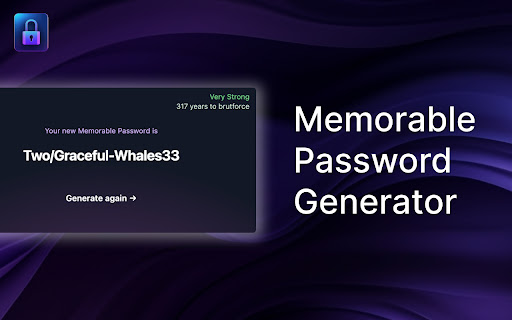
Memorable Password Generator is a free tool that allows you to create very strong passwords that are easy to remember in one click.

The best passwords are long, generated randomly and unique. Unfortunately, passwords that are long, random-looking and hard to guess are also difficult to remember. Memorable Password Generator helps you get the best of both, a strong password and an easier to remember one.

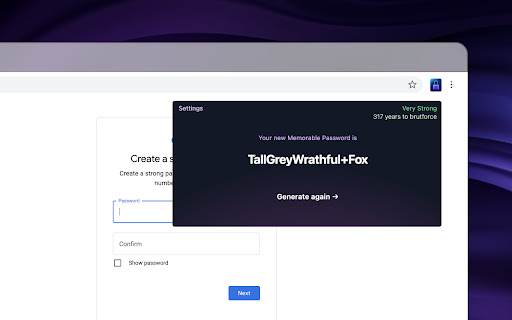
The way it works is simple, when you click the browser action button, the password is generated and you can copy it one one click. If the password does not look good, you can generate another one in one click.

What really makes Memorable Password Generator special is that, unlike most secure password generators, it doesn't output totally random and hard-to-remember passwords. Instead, the password is generated with recognizable words, but with random letters, capitals and random special characters included. It makes the password harder to guess, but at the same time, easier to remember as it is composed of real words.

Memorable Password Generator is fully secure and no password is stored. Passwords are only shown to you when generated and disappear when you close the extension popup.

You can also completely customize the patterns for your generated passwords.
For example setup a password pattern such as {0-9}{0-9}{0-9}_{word}{WORD}{symbol} or {word?}{symbol}{Word}66

Here's a list of items you can use for your custom password pattern :

{WORD} : random uppercase word
{word} : random lowercase word
{Word} : random capitalized word
{word?} : random word with random case (lowercase, uppercase or capitalized)
{symbol} : random symbol
{a-z} : random lowercase letter
{A-Z} : random uppercase letter
{a-zA-Z} : random letter with random case (lowercase or uppercase)
{0-9} : random number.

Any other characters added without brackets { } will be included literally (fixed) in the password.
Technical
- Version
- 1.1.2
- Manifest
- V3
- Size
- 186KiB
- Min Chrome
- 88
- Languages
- 1
- Featured
- Yes
Metadata
- ID
- agpjopjelkfpdkjpmmlbcppkfkahddkc
- Developer ID
- u3a5341ab64e1028e750568fbcc59a3c3
- Developer Email
- [email protected]
- Created
- Jun 25, 2023
- Last Updated (Store)
- Mar 28, 2026
- Last Scraped
- Jun 22, 2026
- Website
- yukicapital.com
- Support URL
- —
- Privacy Policy
- —
Similar extensions
Alternatives to Memorable Password Generator, ranked by description similarity.

Password Generator
Generate strong passwords with one click!
—

Tough Password
Password generation and insertion
4
★ 5.0

Password Generator
Generate strong cryptographically-secure passwords easily
—

Random password generator
Simple tool to generate strong and secure passwords.
10.0K
★ 4.1

Password Generator by Sidd
Generator stong passwords of length 8 to 15 with atleast a lower case, a upper case, a digit and a special character
4

Strong Password Generator
Strong and Secure Password Generator
92
★ 5.0

Password Generator
Password Generator is an application to generate a strong and secure password.
2

SecurePass - Crafting Unbreakable Beauty
Generate secure and elegant passwords with ease.
5
Data sourced from the Chrome Web Store · last verified Jun 22, 2026.