
Meet Reaction Keydown
Enable keydown to run the reaction function of Google Meet.
As of June 2026, Meet Reaction Keydown has 109 users and a 5.00/5 rating from 1 reviews in the Accessibility category.
Usersdown 6.0 percent−6.0%
109
109
Ratingno change0%
5.00
1 reviews
Reviewsno change0%
1
Version
1.1.1
Manifest V3
History
3 snapshotsTracking since Apr 1, 2026.
View as table
| Date | Users | Rating | Reviews | Version |
|---|---|---|---|---|
| Apr 1, 2026 | 116 | 5.00 | 1 | 1.1.1 |
| May 3, 2026 | 117 | 5.00 | 1 | 1.1.1 |
| Jun 2, 2026 | 112 | 5.00 | 1 | 1.1.1 |
| Now | 109 | 5.00 | 1 | 1.1.1 |
Permissions & access
- Permissions
- None declared
- Host access
- None declared
Screenshots
About
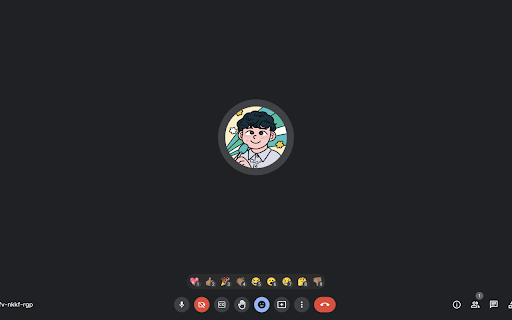
By default, the reaction function of Google Meet can only be executed by mouse operation. This extension allows key operation. Specifically, each reaction is assigned to one to nine keys, and the reaction corresponding to each key can be executed. It also comes with a function to keep the reaction window open at the start of a meeting and a function to perform a series of reactions by pressing a key long enough.
Technical
- Version
- 1.1.1
- Manifest
- V3
- Size
- 28.18KiB
- Min Chrome
- 88
- Languages
- 2
- Featured
- Yes
Metadata
- ID
- agliiaikkgebokbnbcfopkbcgnkoifjf
- Developer ID
- uea9fca4c86622a5f3056baef3a93b4c8
- Developer Email
- [email protected]
- Created
- Feb 13, 2023
- Last Updated (Store)
- Apr 22, 2024
- Last Scraped
- Jun 2, 2026
- Website
- —
- Support URL
- —
- Privacy Policy
- —
Similar extensions
Alternatives to Meet Reaction Keydown, ranked by description similarity.

Meet Reactions Shortcuts
Add keyboard shortcuts for Google Meet reactions.
205
★ 5.0

Google Meet Keybinding
Control Google Meet with keyboard shortcuts. Toggle mic, camera, and navigate meetings from anywhere with global hotkeys.
8
★ 5.0

Meet Protect - microphone & camera protection
A Google Meet protector against the accidental microphone and camera opening.
254
★ 5.0

Super Keys
Configure keyboard shortcuts to perform JavaScript actions on sites.
35
★ 5.0

Fullscreen Google Meet
View Screenshare in full screen on Google Meet
74
★ 1.0
fake-google-keyboard-shortcuts
This extension binding keyboard short cuts on google.com
92

Extension Mute G**gle Me*t
spam emoji | spam help | mute local
—
★ 4.0

KT Mouse Gestures
Mouse Gestures.
56
★ 3.7
Data sourced from the Chrome Web Store · last verified Jun 2, 2026.