
智能编码转换 Set Character Encoding
自动检测和转换网页编码,支持多种编码格式
As of June 2026, 智能编码转换 Set Character Encoding has 544 users and a 3.00/5 rating from 1 reviews in the Developer Tools category.
Usersup 25.6 percent+25.6%
544
544
Ratingno change0%
3.00
1 reviews
Reviewsno change0%
1
Version
1.3.0
Manifest V3
History
5 snapshotsTracking since Apr 1, 2026.
View as table
| Date | Users | Rating | Reviews | Version |
|---|---|---|---|---|
| Apr 1, 2026 | 433 | — | — | 1.3.0 |
| Apr 21, 2026 | 440 | — | — | 1.3.0 |
| May 7, 2026 | 511 | 3.00 | 1 | 1.3.0 |
| May 18, 2026 | 509 | 3.00 | 1 | 1.3.0 |
| Jun 1, 2026 | 535 | 3.00 | 1 | 1.3.0 |
| Now | 544 | 3.00 | 1 | 1.3.0 |
Permissions & access
- Permissions
- contextMenusstoragescriptingtabs
- Host access
- <all_urls>
Screenshots


About
编码切换器Set Character Encoding是一款功能强大的Chrome扩展,专为处理网页字符编码问题而设计。用户可通过右键菜单或扩展图标轻松切换网页编码,支持 42种 主流编码,包括UTF-8、GBK、Big5等多种常见编码格式。此外,该插件具备智能编码检测功能,能够分析当前页面编码并提供优化建议。当检测到因编码导致的乱码时,系统将在页面顶部提供提示,允许用户快速切换至UTF-8或其他正确编码。用户还可通过配置页面设置默认编码、启用/禁用自动检测,并选择忽略特定网站提示。本插件由上海及和网络科技有限公司提供,致力于提升多语言网页浏览体验。
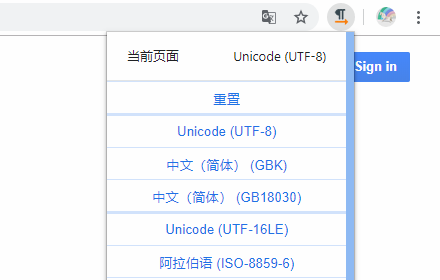
通过右键菜单或扩展图标选择,支持UTF-8、GBK、GB2312、GB18030、Big5、UTF-16LE、EUC-KR、Shift-JIS、EUC-JP、ISO-2022-JP、Windows-874、Windows-1254、ISO-8859-7、Windows-1253、Windows-1252、ISO-8859-15、Macintosh、Windows-1258、ISO-8859-2、Windows-1250等多种编码。

"Encoding Switcher" (Set Character Encoding) is a robust Chrome extension specifically engineered to address web page character encoding issues. Users can seamlessly switch webpage encodings via the right-click menu or extension icon, with support for 42 mainstream encoding standards including UTF-8, GBK, and Big5, among other commonly used formats.

Furthermore, the extension is equipped with an intelligent encoding detection feature that analyzes the current page's encoding and offers optimization recommendations. When garbled text caused by encoding discrepancies is detected, the system will display a prompt at the top of the page, enabling users to swiftly switch to UTF-8 or other appropriate encodings.

Users can also configure default encodings through the settings page, enable/disable automatic detection, and select specific websites for which prompts should be ignored. Developed by Shanghai Jihe Network Technology Co., Ltd., this extension is committed to enhancing the multilingual web browsing experience.

Encoding options, accessible via the right-click menu or extension icon, include UTF-8, GBK, GB2312, GB18030, Big5, UTF-16LE, EUC-KR, Shift-JIS, EUC-JP, ISO-2022-JP, Windows-874, Windows-1254, ISO-8859-7, Windows-1253, Windows-1252, ISO-8859-15, Macintosh, Windows-1258, ISO-8859-2, and Windows-1250.
Technical
- Version
- 1.3.0
- Manifest
- V3
- Size
- 157KiB
- Min Chrome
- 88
- Languages
- 1
- Featured
- No
Metadata
- ID
- aglanpgoidepajogaaimeodfblnddeoa
- Developer ID
- u7b7ccf7f48560d75679c86ed2b4e662b
- Developer Email
- [email protected]
- Created
- Jul 17, 2025
- Last Updated (Store)
- Sep 19, 2025
- Last Scraped
- Jun 1, 2026
- Website
- ijihe.com
- Support URL
- —
- Privacy Policy
- https://www.ijihe.com/privacy-Charset.html
Similar extensions
Alternatives to 智能编码转换 Set Character Encoding, ranked by description similarity.

Encoding Tool
Encode/decode: Base64/URL/Unicode/Hex/HTML, MD5/SHA hash, UUID/GUID. Offline, 10 languages.
485
★ 5.0

替换字体的中文部分为雅黑
替换字体的中文部分为雅黑
10.0K
★ 4.7

en/de coder
A simple encoder/decoder for Base64, Hex, and URI
20
★ 5.0
Charset
Modify the default encoding for the website
90.0K
★ 4.8

URL Encoder/Decoder
Automatically Encode & Decode URL with easy to use UI.
187
★ 5.0

字体换成苹方
字体换成苹方
1.0K
★ 4.8

EncodeDecode
A simple browser extension for encoding and decoding strings.
—

Dev Tools
Integrated developer tool suite: JSON/XML formatting, text encryption/decryption, Base64 encoding/decoding, encoding conversion
84
Data sourced from the Chrome Web Store · last verified Jun 1, 2026.