AI Assistant
AI Assistant Chrome Extension
As of June 2026, AI Assistant has 4 users in the Productivity category.
Usersno change0%
4
4
Ratingno change0%
—
— reviews
Reviewsno change0%
—
Version
1.0.1
Manifest V3
90-day change · In the last 90 days this extension 1 version update.
History
3 snapshotsTracking since May 26, 2026.
View as table
| Date | Users | Rating | Reviews | Version |
|---|---|---|---|---|
| May 26, 2026 | — | — | — | 1.0.0 |
| Jun 2, 2026 | — | — | — | 1.0.0 |
| Jun 8, 2026 | 3 | — | — | 1.0.1 |
| Now | 4 | — | — | 1.0.1 |
Permissions & access
- Permissions
- storagesidePanelcontextMenustabsscriptingdeclarativeNetRequestdeclarativeNetRequestWithHostAccessnotificationsactiveTabidentity
- Host access
- https://assistant.tholight.top/*, https://assistant.zxtcode.com/*, https://api.openai.com/*, https://api.anthropic.com/*, https://generativelanguage.googleapis.com/*, https://ipapi.co/*, https://ipinfo.io/*, https://get.geojs.io/*
Screenshots


About
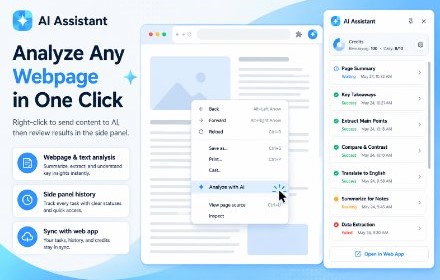
AI Assistant for Chrome helps you turn webpages into actionable AI analysis tasks. While reading articles, research materials, news, blogs, or selected text, simply right-click and choose “Analyze with AI” to extract the content and submit it for analysis.

You can review your analysis history directly in the Chrome side panel, open detailed results, or continue managing everything on the AI Assistant website. The extension works together with the web app, so you can submit content from the browser and view, organize, and manage results on the website.

Key Features

Right-click webpages, selected text, links, or images to create AI analysis tasks
Automatically extracts page content to avoid manual copy and paste
View analysis history from the Chrome side panel
Syncs with the AI Assistant website for continued viewing and management
Supports signed-in accounts and guest mode
Multi-language interface with request language adaptation
Technical
- Version
- 1.0.1
- Manifest
- V3
- Size
- 1.17MiB
- Min Chrome
- 88
- Languages
- 2
- Featured
- No
Metadata
- ID
- afkglgjlljegokomiflpfndmebpbhbhk
- Developer ID
- u800d6c0335a9f5e344f173a414eb0963
- Developer Email
- [email protected]
- Created
- May 25, 2026
- Last Updated (Store)
- May 26, 2026
- Last Scraped
- Jun 8, 2026
- Privacy Policy
- https://assistant.zxtcode.com/
Data sourced from the Chrome Web Store · last verified Jun 8, 2026.