
Archiver
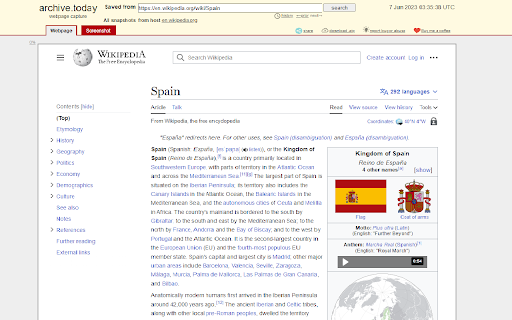
Opens the current page as an archived page in a new tab.
As of June 2026, Archiver has 123 users and a 4.00/5 rating from 4 reviews in the Accessibility category.
Usersdown 2.4 percent−2.4%
123
123
Ratingno change0%
4.00
4 reviews
Reviewsno change0%
4
Version
1.5
Manifest V3
History
3 snapshotsTracking since Apr 1, 2026.
View as table
| Date | Users | Rating | Reviews | Version |
|---|---|---|---|---|
| Apr 1, 2026 | 126 | 4.00 | 4 | 1.5 |
| May 3, 2026 | 133 | 4.00 | 4 | 1.5 |
| Jun 2, 2026 | 128 | 4.00 | 4 | 1.5 |
| Now | 123 | 4.00 | 4 | 1.5 |
Permissions & access
- Permissions
- tabsstorage
- Host access
- None declared
Screenshots
About
Have you ever wanted to simply view an archived version of a website? The Archiver Chrome extension lets you easily archive any webpage you're currently browsing with a single click. Simply click the Archiver button in the toolbar, and the extension will automatically create a new tab with the archived version of the current webpage.

With Archiver, you can easily preserve important web content for future reference, or access older versions of webpages that may no longer be available online. The extension is lightweight and easy to use, and works seamlessly with your existing browsing experience.
Technical
- Version
- 1.5
- Manifest
- V3
- Size
- 5.93KiB
- Min Chrome
- 88
- Languages
- 1
- Featured
- Yes
Metadata
- ID
- afifhdmbkfliilndimmkjdoiciafcllo
- Developer ID
- u8cf88c0373c1cbf92530e01cd9672284
- Developer Email
- [email protected]
- Created
- Oct 11, 2023
- Last Updated (Store)
- Aug 8, 2024
- Last Scraped
- Jun 2, 2026
- Website
- —
- Support URL
- —
- Privacy Policy
- —
Similar extensions
Alternatives to Archiver, ranked by description similarity.

myTabSaver
myTabSaver is a simple and convenient Chrome extension designed to save website URLs with minimal effort. Whether you’ve found a…
2

Tab Saver - Bookmark
The Chrome extension enables easy saving and reloading of multiple tabs, saving time and memory.
36

Wayback
Go to the Internet Archive version of this site
172

GrabTheLink
Save the link from the current tab.
3

Downloads
Quick access button to the download page
13
★ 5.0

uniqtab
Automatically closes duplicate tabs, keeping only the latest one.
7

Allow Copy/Paste
An extension to permit copy and paste on sites that block this feature.
6.0K
★ 4.0

Copy All Urls
"Copy All URLs" is a Chrome extension designed to simplify the process of copying all open tabs' URLs and titles. With a single…
7.0K
★ 3.9
Data sourced from the Chrome Web Store · last verified Jun 2, 2026.