
Notion Presenter
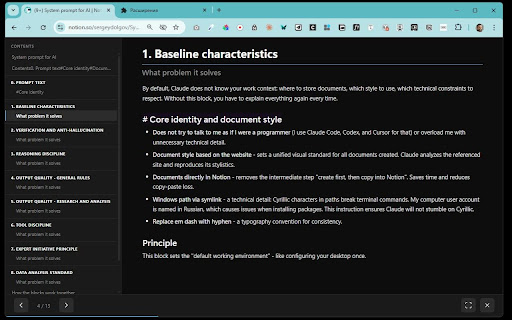
Turn published Notion pages into beautiful presentations. Split by headings or dividers, navigate with keyboard.
As of June 2026, Notion Presenter has 8 users in the Productivity category.
Usersup 300.0 percent+300.0%
8
8
Ratingno change0%
—
— reviews
Reviewsno change0%
—
Version
1.0.0
Manifest V3
History
8 snapshotsTracking since Apr 1, 2026.
View as table
| Date | Users | Rating | Reviews | Version |
|---|---|---|---|---|
| Apr 1, 2026 | 2 | — | — | 1.0.0 |
| Apr 17, 2026 | 2 | — | — | 1.0.0 |
| Apr 22, 2026 | 3 | — | — | 1.0.0 |
| Apr 27, 2026 | 2 | — | — | 1.0.0 |
| May 10, 2026 | 2 | — | — | 1.0.0 |
| May 15, 2026 | 5 | — | — | 1.0.0 |
| May 22, 2026 | 7 | — | — | 1.0.0 |
| Jun 4, 2026 | 6 | — | — | 1.0.0 |
| Now | 8 | — | — | 1.0.0 |
Permissions & access
- Permissions
- activeTab
- Host access
- https://*.notion.site/*, https://*.notion.so/*
Screenshots


About
Transform any published Notion page into a clean, full-screen presentation with one click.

FEATURES:
• 4 split modes — divide slides by horizontal dividers, H1, H2, or H1+H2 headings
• 4 visual themes — Light, Dark, Notion Classic, and Gradient Dark
• H1/H2 hierarchy — sub-heading slides show their parent heading for context
• Keyboard navigation — Arrow keys, Space, Home/End, Escape, F for fullscreen
• Touch support — swipe left/right on mobile devices
• Progress bar and slide counter
• Preserves Notion formatting: tables, code blocks, images, callouts, toggle blocks

HOW TO USE:
1. Open any published Notion page (*.notion.site)
2. Click the Notion Presenter icon in your toolbar
3. Choose split mode and theme
4. Click "Start Presentation"

PRIVACY:
• No data collection — everything runs locally in your browser
• No external servers or analytics
• Open source

Perfect for teachers, presenters, and anyone who writes content in Notion and wants to present it without switching tools.
Technical
- Version
- 1.0.0
- Manifest
- V3
- Size
- 1.29MiB
- Min Chrome
- 88
- Languages
- 1
- Featured
- No
Metadata
- ID
- afbnjdeadneempphckhldanfoafpnoie
- Developer ID
- u5caebf56ec9f4d2f71b6e0f7e0703c6f
- Developer Email
- [email protected]
- Created
- Mar 26, 2026
- Last Updated (Store)
- Mar 26, 2026
- Last Scraped
- Jun 10, 2026
- Website
- —
- Support URL
- —
Data sourced from the Chrome Web Store · last verified Jun 10, 2026.