Boost Editor -Right Click in SM Post Text Box
Your Chrome extension to copy text from Social Media Post textbox and Boost in Boost Editor
As of June 2026, Boost Editor -Right Click in SM Post Text Box has 82 users and a 5.00/5 rating from 1 reviews in the Social & Communication category.
Usersdown 1.2 percent−1.2%
82
82
Ratingno change0%
5.00
1 reviews
Reviewsno change0%
1
Version
1.3
Manifest V3
History
3 snapshotsTracking since Apr 1, 2026.
View as table
| Date | Users | Rating | Reviews | Version |
|---|---|---|---|---|
| Apr 1, 2026 | 83 | 5.00 | 1 | 1.3 |
| May 3, 2026 | 84 | 5.00 | 1 | 1.3 |
| Jun 2, 2026 | 87 | 5.00 | 1 | 1.3 |
| Now | 82 | 5.00 | 1 | 1.3 |
Permissions & access
- Permissions
- activeTabscriptingcontextMenus
- Host access
- None declared
Screenshots


About
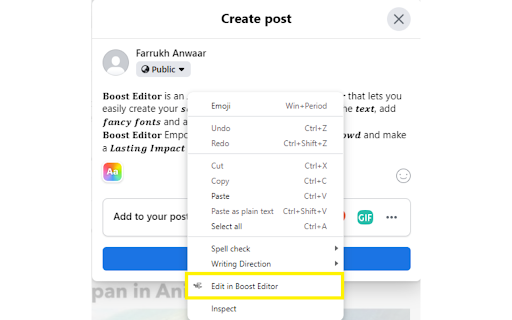
Simply right-click on your favourite social media platform to continue editing in Boost Editor (https://boosteditor.com). By selecting the "Edit in Boost Editor" button, you can continue editing your post without losing any previously typed content. The Chrome extension will automatically copy and paste your text into the AI-powered Boost Editor for a smooth editing experience to boost your social media game.

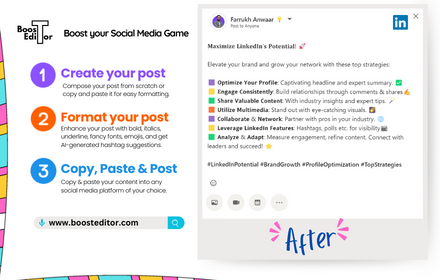
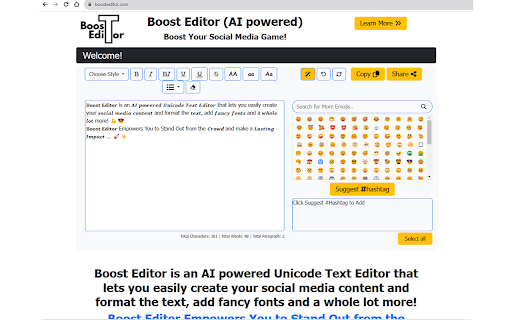
Boost Editor is an AI powered Unicode Text Editor that lets you easily create your social media content and format the text, add fancy fonts and a whole lot more!

Boost Editor Empowers You to Stand Out from the Crowd and make a Lasting Impact ...
BoostEditor allows you to break free from the limitations of social media platforms like LinkedIn, Twitter, or Facebook. Now, you can effortlessly add style to your posts by using 𝗯𝗼𝗹𝗱, 𝐼𝑡𝑎𝑙𝑖𝑐, and u̲n̲d̲e̲r̲l̲i̲n̲e̲ text, along with thousands of eye-catching 𝓕𝓸𝓷𝓽𝓼, Emojis 😀 , AI powered Emoji Selection and Hashtag Generator, all available within a powerful Unicode text editor.

Boost Editor is the best 𝓕𝓪𝓷𝓬𝔂 Font Generator...
Boost Editor offers a seamless and user-friendly experience, making it the ultimate choice for transforming your plain text into captivating and stylish content, guaranteed to leave a lasting impression.
Technical
- Version
- 1.3
- Manifest
- V3
- Size
- 6.69KiB
- Min Chrome
- 88
- Languages
- 1
- Featured
- No
Metadata
- ID
- aejdgjfpimlamfapdgjhdeblibhophma
- Developer ID
- u9a5abfda7b2bb7a599abf6f29241ea3b
- Developer Email
- [email protected]
- Created
- Aug 4, 2023
- Last Updated (Store)
- Aug 4, 2023
- Last Scraped
- Jun 2, 2026
- Website
- boosteditor.com
- Support URL
- —
- Privacy Policy
- https://boosteditor.com/privacypolicy.html
Similar extensions
Alternatives to Boost Editor -Right Click in SM Post Text Box, ranked by description similarity.

Social Superstar
Helper extension for creating and managing social media posts with AI assistance
4

SocialScribe - AI Replies for Twitter, LinkedIn
Boost your Twitter and LinkedIn interactions with SocialScribe. Deliver engaging replies instantly with a single click.
14
★ 4.9

Fancy Font Generator
Generate fancy text using various Unicode character styles and easily copy them.
23

Social Media AI Comment Writer
Boost engagement using Social Media AI Comment Writer — the AI comment generator and message responder for fast, smart replies.
71

LinkedIn Text Formatting Assistant
Elevate Your LinkedIn Posts with Ease – Now Better Than Ever!
Are you tired of plain, unformatted LinkedIn posts? Stand out from…
172
★ 4.0

Social-Posteur
AI-powered social media commenting and reply tool for LinkedIn, Facebook, and X
1

Socials - Generate Posts in One Click
Create viral posts for X and LinkedIn instantly with AI. Match your unique voice with custom personas.
46
★ 5.0

AI Social Replier - GPT Response Generator
Write better social media replies instantly. Get AI suggestions for LinkedIn, Twitter & Facebook comments in your preferred style.
57
★ 5.0
Data sourced from the Chrome Web Store · last verified Jun 2, 2026.