
AlphaBag
Extension to help with Wordle
As of June 2026, AlphaBag has 32 users in the fun category.
Usersup 6.7 percent+6.7%
32
32
Ratingno change0%
—
— reviews
Reviewsno change0%
—
Version
1.0.2
Manifest V3
History
3 snapshotsTracking since Apr 1, 2026.
View as table
| Date | Users | Rating | Reviews | Version |
|---|---|---|---|---|
| Apr 1, 2026 | 30 | — | — | 1.0.2 |
| May 3, 2026 | 27 | — | — | 1.0.2 |
| Jun 2, 2026 | 26 | — | — | 1.0.2 |
| Now | 32 | — | — | 1.0.2 |
Permissions & access
- Permissions
- tabsstorage
- Host access
- None declared
Screenshots
About
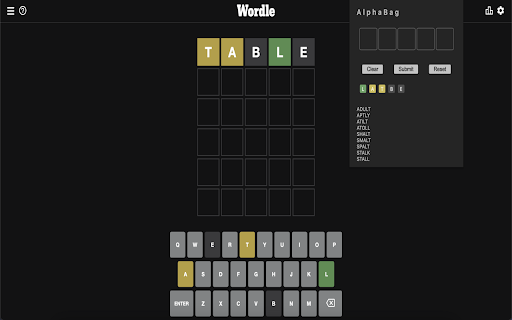
Wordle throwing you off? Need a little alphabetical assist?

AlphaBag offers a simple filtering algorithm to provide you with the options available given your current standing in Wordle.

Feel like it's cheating? Don't worry! You can choose which letters you want to use and which you want to leave out. AlphaBag is designed to mostly make Wordle a little easier, but we won't be offended if you'd rather play the way the Wordle team intended.

v1.0.0

HOW TO:
1. Select a box
2. Type the letter(s) you want to filter
3. Select the color that corresponds with those letters
4. Hit Submit!

Make a mistake? You can hit Reset to delete all the letters OR just delete the letters independently.


Features:
- Not on the Wordle page? A button will appear to link you straight to Wordle!
- Independent letter inputing to allow you to submit 5 characters at a time or only the few you want to use. To do so simply enter the letter and color in it's relative space
- The extension will show you all UNIQUE letters you've activated and each is able to be deleted individually
- Hotkeys for quicker access (explained below)
- "Clear" button for easily resetting the input fields
- "Submit" button to activate letters in the filter
- "Reset" button to return extension to initial condition
- Data preservation, so that if you accidentally close and open you don't have to keep retyping everything


Hotkeys:
- To traverse the input fields for the letters you can use left ( <- ) and right ( -> ) arrow keys.
- To jump to a specific position in the word you can use numbers ( 1 - 5 )
- To Submit you can use "Enter" or "Return"
- To set a space to Grey you can use comma ( , )
- To set a space to Yellow you can use period ( . )
- To set a space to Green you can use slash ( / )


*** DISCLAIMER: ALPHABAG IS NOT AT ALL AFFILIATED WITH WORDLE OR THE NY TIMES ***
Technical
- Version
- 1.0.2
- Manifest
- V3
- Size
- 57.57KiB
- Min Chrome
- 88
- Languages
- 1
- Featured
- Yes
Metadata
- ID
- aeecchlpkihnbkjemkjkofeeckcehcfd
- Developer ID
- uce4f2d3f9c174c1ba33bc916bf1abac0
- Developer Email
- [email protected]
- Created
- Jun 8, 2022
- Last Updated (Store)
- Jul 14, 2022
- Last Scraped
- Jun 2, 2026
- Website
- —
- Support URL
- —
- Privacy Policy
- —
Similar extensions
Alternatives to AlphaBag, ranked by description similarity.

Wordle Solver
An extension to solve Wordles for you. Only works on the NYTimes Wordle page.
33

Reportle - a Wordle Tool
A tool that provides feedback on Wordle strategy
8

Wordle Master: Solver & Game
The ultimate Wordle companion. Auto-solve NYT & variants, manual input mode, and a built-in Wordle game.
4

Wordle
Autocompletion and smart suggestions for popular game
16

Wordle Suggest
Word autocomplete for Wordle.
4

Wordle Predictor
Predicts the next best word for each row in wordle
13

ReWordle
ReWordle provides Wordle insights through its light yet powerful guessing algorithm!
1

NYT Games Buddy
A suite of tools and helpers for NYT Games — Strands, Connections, Pips, and more.
5
★ 5.0
Data sourced from the Chrome Web Store · last verified Jun 2, 2026.