
Erasio – Gemini Omni Watermark Remover (Images & Videos)
Remove Gemini watermarks from images and videos instantly with AI precision
As of June 2026, Erasio – Gemini Omni Watermark Remover (Images & Videos) has 1,000 users and a 5.00/5 rating from 2 reviews in the Productivity category.
Usersno change0%
1.0K
1,000
Ratingno change0%
5.00
2 reviews
Reviewsno change0%
2
Version
1.0.1
Manifest V3
90-day change · In the last 90 days this extension 1 version update.
History
5 snapshotsTracking since May 17, 2026.
View as table
| Date | Users | Rating | Reviews | Version |
|---|---|---|---|---|
| May 17, 2026 | — | — | — | 1.0.0 |
| May 23, 2026 | — | — | — | 1.0.0 |
| May 30, 2026 | 8 | — | — | 1.0.0 |
| Jun 5, 2026 | 30 | — | — | 1.0.1 |
| Jun 13, 2026 | 260 | 5.00 | 2 | 1.0.1 |
| Now | 1.0K | 5.00 | 2 | 1.0.1 |
Changelog
- May 30, 2026description
Erasio – Remove Gemini & Google AI Studio Watermarks Instantly

Erasio is a powerful Chrome extension that removes the “Sparkle” watermark added to AI-generated images from Google Gemini and Google AI Studio. With just one click, you can download clean, watermark-free images directly from your browser — no Photoshop, no manual editing, and no third-party upload tools required.

Whether you create AI artwork, product mockups, thumbnails, social media posts, blog graphics, illustrations, or marketing visuals, Erasio helps you save clean, presentation-ready images instantly.

Key Features
✨ Automatic Watermark Removal

Erasio automatically detects and removes the Gemini Sparkle watermark directly on:
gemini.google.com
aistudio.google.com

Once enabled, images are cleaned automatically before download, allowing you to save watermark-free versions directly from the original download button.

📤 Upload & Clean Existing Images
Already downloaded an image?
Use the built-in popup uploader to:
Drag & drop images
Paste screenshots
Upload saved Gemini exports

Erasio processes the image locally in your browser and removes the watermark in seconds.

🎯 High-Quality Pixel Restoration
This produces:
Cleaner output
Sharp image quality
Accurate pixel restoration
No smudging or distortion

🔒 Privacy First
Your images never leave your device.

Erasio does NOT:
Upload your images to external servers
Send files to AI models
Store your processed images

All processing happens locally inside your browser for maximum privacy and security.

🌍 Multi-Language Support
Erasio includes support for 14 languages, including:
English
Spanish
French
German
Arabic
Urdu
Chinese
Japanese
Korean
Portuguese
Russian
Italian
Turkish
Hindi

Includes full RTL (Right-to-Left) layout support for Arabic and Urdu.
⚙️ Customizable Experience
Control how Erasio works with built-in settings such as:
Auto-download options
Processing history
Notification controls
Storage management
Auto-removal preferences
Dark mode support
Perfect For
AI artists
Designers
Content creators
YouTubers
Bloggers
Social media managers
Marketers
Thumbnail creators
Anyone using Gemini-generated images
Why Choose Erasio?

✔ One-click watermark removal
✔ Works directly inside Gemini & AI Studio
✔ No editing skills required
✔ Fast & lightweight
✔ Privacy-focused processing
✔ Clean, high-quality output
✔ No external image uploads

Keywords: Gemini watermark remover, Google AI Studio watermark remover, AI image cleaner, remove Gemini sparkle watermark, AI image enhancement, watermark remover Chrome extension, Gemini image cleaner, AI-generated image tools, privacy-focused image processing, in-browser watermark removal.
Erasio is a Chrome extension that helps remove visible Sparkle watermarks from supported AI-generated images and videos directly in your browser.

The extension works with media generated through supported Google AI tools and provides a fast workflow without requiring external editing software or manual image cleanup.

With Erasio, you can:

Remove visible Sparkle watermarks from images
Clean supported AI-generated videos
Process files directly inside Chrome
Upload previously downloaded files for cleanup
Keep processing local on your device

🎬 IMAGE AND VIDEO SUPPORT
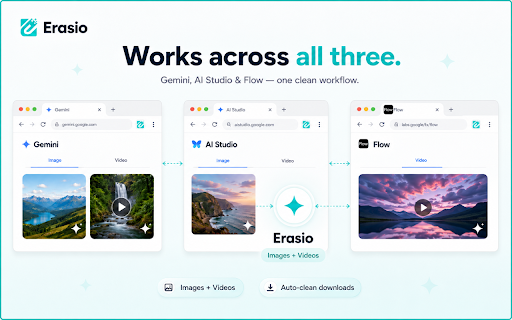
Erasio supports both images and videos, including media generated through Google Flow and Omni Flash based workflows.

✨ AUTOMATIC DETECTION
When supported pages are open, Erasio can automatically detect downloadable media and process it before saving.

📤 CLEAN EXISTING FILES
You can also upload existing files using the built-in uploader. Drag and drop files, paste screenshots, or select media already saved on your device.

🔒 LOCAL PROCESSING
All processing happens locally in your browser. Files are not uploaded to external servers or stored remotely.

🌍 MULTI-LANGUAGE SUPPORT
Erasio includes support for multiple languages, including RTL layout support for Arabic and Urdu.

⚙️ CUSTOMIZATION OPTIONS
The extension includes configurable settings such as:

Auto-download preferences
Processing history
Notification controls
Storage management
Dark mode support

💡 HOW ERASIO WORKS
Unlike traditional AI-based cleanup tools that estimate missing pixels, Erasio uses reverse-blending reconstruction methods designed to restore the original image data hidden beneath supported overlays.

🌐 WEB VERSION AVAILABLE
Bulk processing and additional export features are also available through the Erasio web platform.

🚀 UPCOMING FEATURES
Future updates may include broader compatibility for additional image formats and expanded mobile support.

Erasio is an independent tool and is not affiliated with or endorsed by Google LLC. Gemini, Google AI Studio, and Google Flow are trademarks of Google LLC.
- May 30, 2026short_description
Remove Gemini watermarks from images instantly with AI precision
Remove Gemini watermarks from images and videos instantly with AI precision
- May 30, 2026name
Erasio - Erase Gemini Watermark
Erasio – Gemini Omni Watermark Remover (Images & Videos)
Permissions & access
- Permissions
- storagealarms
- Host access
- https://erasio.io/*
Screenshots


About
Erasio is a Chrome extension that helps remove visible Sparkle watermarks from supported AI-generated images and videos directly in your browser.

The extension works with media generated through supported Google AI tools and provides a fast workflow without requiring external editing software or manual image cleanup.

With Erasio, you can:

Remove visible Sparkle watermarks from images
Clean supported AI-generated videos
Process files directly inside Chrome
Upload previously downloaded files for cleanup
Keep processing local on your device

🎬 IMAGE AND VIDEO SUPPORT
Erasio supports both images and videos, including media generated through Google Flow and Omni Flash based workflows.

✨ AUTOMATIC DETECTION
When supported pages are open, Erasio can automatically detect downloadable media and process it before saving.

📤 CLEAN EXISTING FILES
You can also upload existing files using the built-in uploader. Drag and drop files, paste screenshots, or select media already saved on your device.

🔒 LOCAL PROCESSING
All processing happens locally in your browser. Files are not uploaded to external servers or stored remotely.

🌍 MULTI-LANGUAGE SUPPORT
Erasio includes support for multiple languages, including RTL layout support for Arabic and Urdu.

⚙️ CUSTOMIZATION OPTIONS
The extension includes configurable settings such as:

Auto-download preferences
Processing history
Notification controls
Storage management
Dark mode support

💡 HOW ERASIO WORKS
Unlike traditional AI-based cleanup tools that estimate missing pixels, Erasio uses reverse-blending reconstruction methods designed to restore the original image data hidden beneath supported overlays.

🌐 WEB VERSION AVAILABLE
Bulk processing and additional export features are also available through the Erasio web platform.

🚀 UPCOMING FEATURES
Future updates may include broader compatibility for additional image formats and expanded mobile support.

Erasio is an independent tool and is not affiliated with or endorsed by Google LLC. Gemini, Google AI Studio, and Google Flow are trademarks of Google LLC.
Technical
- Version
- 1.0.1
- Manifest
- V3
- Size
- 245KiB
- Min Chrome
- 88
- Languages
- 13
- Featured
- No
Metadata
- ID
- aedhekmakfgbcknofpiccffacdjcgdpp
- Developer ID
- u6330b2158a9b7efdd3b4d7fe2b6d0422
- Developer Email
- [email protected]
- Created
- May 16, 2026
- Last Updated (Store)
- May 27, 2026
- Last Scraped
- Jun 13, 2026
- Website
- https://erasio.io/
- Support URL
- https://erasio.io/contact
- Privacy Policy
- https://erasio.io/privacy
Data sourced from the Chrome Web Store · last verified Jun 13, 2026.