
Icon Bookmarks - Desktop Style New Tab
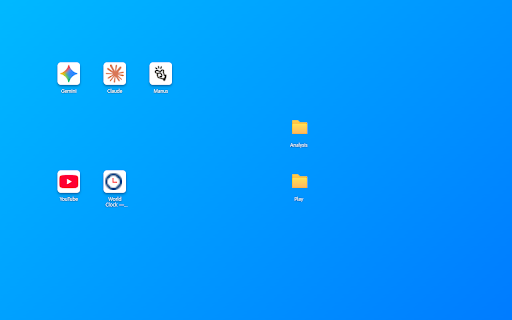
Turn Chrome's new tab into a desktop-style bookmark workspace where you can freely place and manage bookmark icons.
As of June 2026, Icon Bookmarks - Desktop Style New Tab has 11 users and a 5.00/5 rating from 1 reviews in the Functionality & UI category.
Usersno change0%
11
11
Ratingno change0%
5.00
1 reviews
Reviewsno change0%
1
Version
1.1.1
Manifest V3
90-day change · In the last 90 days this extension 2 version updates.
History
4 snapshotsTracking since May 21, 2026.
View as table
| Date | Users | Rating | Reviews | Version |
|---|---|---|---|---|
| May 21, 2026 | — | — | — | 1.0 |
| May 27, 2026 | — | — | — | 1.0 |
| Jun 3, 2026 | 2 | — | — | 1.0.3 |
| Jun 9, 2026 | 5 | 5.00 | 1 | 1.1.1 |
| Now | 11 | 5.00 | 1 | 1.1.1 |
Permissions & access
- Permissions
- bookmarksfaviconstorage
- Host access
- None declared
Screenshots


About
Turn Your Chrome New Tab into a PC Desktop
- "Icon Bookmarks" is an intuitive bookmark manager that transforms your Chrome New Tab into a Windows-style desktop.

Key Features
- Free Arrangement: Drag and drop icons to place them anywhere you want.
- Folder Organization: Group multiple websites into folders and decorate them with emojis.
- Multi-Select & Right-Click: Drag your mouse to select multiple icons at once, and right-click to open, move, or delete them easily.
- Quick Search (Ctrl+F): Instantly find hidden bookmarks and folder paths in real-time.
- Auto-Sync: 100% real-time sync with your existing Chrome bookmarks.
- Custom Backgrounds: Change the wallpaper using your own photos or colors, and adjust the brightness for better icon visibility.

Privacy Protection
- Works Completely Offline: We do not send or collect your data to external servers. All your information is safely stored only on your local PC.
Technical
- Version
- 1.1.1
- Manifest
- V3
- Size
- 92.41KiB
- Min Chrome
- 88
- Languages
- 10
- Featured
- No
Metadata
- ID
- aeckkllmbheplcanakpfpohefcnjjhei
- Developer ID
- ub57d2cc55ab7189dfd7d6e9fdb1c729e
- Developer Email
- [email protected]
- Created
- May 20, 2026
- Last Updated (Store)
- May 30, 2026
- Last Scraped
- Jun 9, 2026
- Website
- —
- Support URL
- —
- Privacy Policy
- —
Data sourced from the Chrome Web Store · last verified Jun 9, 2026.