
Screenshot to ChatGPT: capture and send
Select an area of any webpage and send it to ChatGPT with a couple clicks. Supports custom prompts and auto-submit.
As of June 2026, Screenshot to ChatGPT: capture and send has 41 users in the Functionality & UI category.
Usersup 2.5 percent+2.5%
41
41
Ratingno change0%
—
— reviews
Reviewsno change0%
—
Version
1.0.1
Manifest V3
History
3 snapshotsTracking since May 7, 2026.
View as table
| Date | Users | Rating | Reviews | Version |
|---|---|---|---|---|
| May 7, 2026 | 40 | — | — | 1.0.1 |
| May 18, 2026 | 47 | — | — | 1.0.1 |
| Jun 1, 2026 | 45 | — | — | 1.0.1 |
| Now | 41 | — | — | 1.0.1 |
Permissions & access
- Permissions
- activeTabscriptingstorage
- Host access
- https://chatgpt.com/*
Screenshots


About
Screenshot to ChatGPT

Capture any part of a webpage and instantly send it to ChatGPT with customizable prompts for quick visual analysis and feedback.
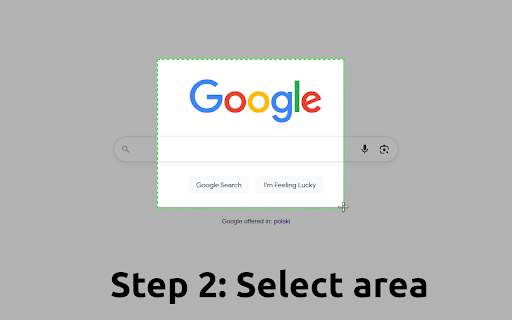
With just two clicks, capture any portion of any webpage and send it directly to ChatGPT with your custom questions or prompts.

🚀 Key Features

📸 Effortless Screenshot Capture
- Select any area on any webpage with an intuitive drag-and-drop interface
- High-quality PNG screenshots preserve all visual details
- No manual file uploads or copy-pasting required. Screenshots automatically appear in your ChatGPT conversation
- Set your own default prompt or just use "What is this?"


💡 Perfect For:

Content Creators & Marketers:
- Analyze competitor websites and social media content, get design inspiration and feedback on visual elements

Developers & Designers:
- Debug UI issues by showing ChatGPT screenshots of problems, analyze design patterns and user interfaces
- Share visual bugs with detailed context

Students & Researchers:
- Capture complex diagrams, charts, and infographics for analysis
- Get explanations of visual content from textbooks or articles
- Analyze historical documents, maps, or scientific illustrations

Business Professionals:
- Analyze competitor products, pricing pages, get feedback on presentations and documents
- Review dashboard data and metrics with AI insights


After installation, don't forget to pin the extension to your toolbar for quick access!
Technical
- Version
- 1.0.1
- Manifest
- V3
- Size
- 21.49KiB
- Min Chrome
- 88
- Languages
- 1
- Featured
- No
Metadata
- ID
- adkkohbnoniidhnekijeeimfapaaamke
- Developer ID
- u6754b2accbdc69e608f8835fc0e78d98
- Developer Email
- [email protected]
- Created
- Aug 12, 2025
- Last Updated (Store)
- Aug 12, 2025
- Last Scraped
- Jun 1, 2026
- Website
- myextension.store
- Support URL
- —
- Privacy Policy
- —
Similar extensions
Alternatives to Screenshot to ChatGPT: capture and send, ranked by description similarity.

Screen Capture - Provide Visual Feedback To Every Team
Draw, annotate and comment directly on-top of your website's UI, then instantly post your feedback to a merge or pull request.
4

Side Chat AI
Turn any webpage into a smart AI Assistant interface. Send any page to Gemini chat and get instant insights, summary or analysis
89
★ 5.0

Screenshot Visible Page — Frosted Glass
Capture a screenshot of the visible part of the current page with one click.
4

ChatGPT Voice Extended
Extend your ChatGPT voice conversations with real-time transcripts and instant downloads
17
★ 3.7

Open ChatGPT in New Tab
Replace your new tab with ChatGPT - the best AI chatbot for instant conversations and coding help
8

QuickCapture - Snipping Tool & Screenshot (Full Page, Visible, Selection)
Take full page, scrolling, visible, or selection screenshots fast. Edit, crop, and manage captures in one snipping tool.
7.0K
★ 5.0

ChatGPTBuff - Enhance Your ChatGPT Web Experience
Customize interface and add utilities to ChatGPT Web
61
★ 5.0
ChatGPT Block Checker
This extensions checks if a website blocked ChatGPT or ChatGPT Plugins for accessing their content.
148
★ 1.0
Data sourced from the Chrome Web Store · last verified Jun 1, 2026.