
PagePulse – SEO Audit, Performance & Website Analyzer
Audit any website for SEO, Performance, Accessibility & Best Practices. Score out of 100 with fixes, history, and SEO X-Ray.
As of June 2026, PagePulse – SEO Audit, Performance & Website Analyzer has 18 users and a 5.00/5 rating from 6 reviews in the Developer Tools category.
Usersno change0%
18
18
Ratingno change0%
5.00
6 reviews
Reviewsno change0%
6
Version
2.6.3
Manifest V3
90-day change · In the last 90 days this extension 3 version updates.
History
9 snapshotsTracking since Apr 9, 2026.
View as table
| Date | Users | Rating | Reviews | Version |
|---|---|---|---|---|
| Apr 9, 2026 | — | — | — | 2.0.0 |
| Apr 20, 2026 | — | — | — | 2.0.0 |
| Apr 26, 2026 | 9 | 5.00 | 3 | 2.3.0 |
| May 9, 2026 | 12 | 5.00 | 5 | 2.5.3 |
| May 14, 2026 | 17 | 5.00 | 6 | 2.6.3 |
| May 21, 2026 | 15 | 5.00 | 6 | 2.6.3 |
| May 27, 2026 | 16 | 5.00 | 6 | 2.6.3 |
| Jun 3, 2026 | 18 | 5.00 | 6 | 2.6.3 |
| Jun 9, 2026 | 19 | 5.00 | 6 | 2.6.3 |
| Now | 18 | 5.00 | 6 | 2.6.3 |
Changelog
- May 9, 2026description
Analyze SEO, performance, and website health instantly with actionable insights.
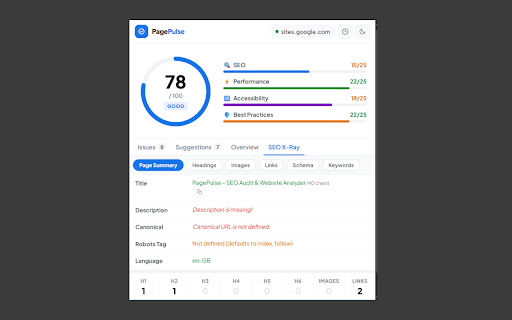
PagePulse is a fast, lightweight Chrome extension to audit and analyze any website for SEO, performance, accessibility, and technical issues-directly in your browser.

No login, no tracking, and no external servers. All audits run locally for speed and privacy.

Key Features

🔍 SEO Audit – Analyze meta tags, headings, links, schema, and on-page SEO
⚡ Performance Analysis – Check page speed, Core Web Vitals, and optimization issues
♿ Accessibility Checker – Find common usability and WCAG issues
🛡 Best Practices – Detect security and technical problems
🔎 SEO X-Ray – Inspect page structure, links, images, and metadata
🔤 Font Inspector – View typography details on any webpage
📊 Keyword Analysis – Evaluate keyword usage and content optimization

 Why PagePulse?

✔ Instant, real-time website analysis
✔ Works directly in your browser
✔ No account required
✔ Privacy-first (no data collection)

Built For-
SEO specialists, tester, developers, designers, marketers, and website owners who want quick, reliable insights without complex tools.

Get Started-
Install PagePulse and start analyzing websites in seconds.
Permissions & access
- Permissions
- activeTabscriptingstorage
- Host access
- None declared
Screenshots


About
PagePulse is a fast, lightweight Chrome extension to audit and analyze any website for SEO, performance, accessibility, and technical issues-directly in your browser.

No login, no tracking, and no external servers. All audits run locally for speed and privacy.

Key Features

🔍 SEO Audit – Analyze meta tags, headings, links, schema, and on-page SEO
⚡ Performance Analysis – Check page speed, Core Web Vitals, and optimization issues
♿ Accessibility Checker – Find common usability and WCAG issues
🛡 Best Practices – Detect security and technical problems
🔎 SEO X-Ray – Inspect page structure, links, images, and metadata
🔤 Font Inspector – View typography details on any webpage
📊 Keyword Analysis – Evaluate keyword usage and content optimization

 Why PagePulse?

✔ Instant, real-time website analysis
✔ Works directly in your browser
✔ No account required
✔ Privacy-first (no data collection)

Built For-
SEO specialists, tester, developers, designers, marketers, and website owners who want quick, reliable insights without complex tools.

Get Started-
Install PagePulse and start analyzing websites in seconds.
Technical
- Version
- 2.6.3
- Manifest
- V3
- Size
- 85.4KiB
- Min Chrome
- 88
- Languages
- 1
- Featured
- No
Metadata
- ID
- adilpnfiiinimepokbhgdddpnafjiimg
- Developer ID
- u93f8527f0c7ef0607902ebb7f29f3010
- Developer Email
- [email protected]
- Created
- Apr 9, 2026
- Last Updated (Store)
- May 4, 2026
- Last Scraped
- Jun 9, 2026
- Website
- —
Data sourced from the Chrome Web Store · last verified Jun 9, 2026.