
SendLock
Finally, an outbox for Gmail. Stop, edit, or undo any email after you hit Send.
As of June 2026, SendLock has 4 users in the Communication category.
Usersdown 33.3 percent−33.3%
4
4
Ratingno change0%
—
— reviews
Reviewsno change0%
—
Version
1.1.16
Manifest V3
90-day change · In the last 90 days this extension 4 version updates.
History
10 snapshotsTracking since Apr 18, 2026.
View as table
| Date | Users | Rating | Reviews | Version |
|---|---|---|---|---|
| Apr 18, 2026 | 6 | — | — | 1.0.67 |
| Apr 23, 2026 | 6 | — | — | 1.0.67 |
| Apr 30, 2026 | 6 | — | — | 1.1.3 |
| May 7, 2026 | 5 | — | — | 1.1.5 |
| May 11, 2026 | 7 | — | — | 1.1.5 |
| May 17, 2026 | 6 | — | — | 1.1.5 |
| May 23, 2026 | 5 | — | — | 1.1.5 |
| May 30, 2026 | 5 | — | — | 1.1.9 |
| Jun 5, 2026 | 6 | — | — | 1.1.9 |
| Jun 14, 2026 | 5 | — | — | 1.1.16 |
| Now | 4 | — | — | 1.1.16 |
Changelog
- May 23, 2026short_description
Stop emails after hitting send. SendLock adds a customizable delay to Gmail so you can undo, edit, or cancel before damage is done.
Finally, an outbox for Gmail. Stop, edit, or undo any email after you hit Send.
- Apr 23, 2026short_description
Protect your reputation with every send. ⚡️ SendLock adds a smart 60-second delay to prevent costly email mistakes.
Stop emails after hitting send. SendLock adds a customizable delay to Gmail so you can undo, edit, or cancel before damage is done.
Permissions & access
- Permissions
- alarmsidentitystoragetabs
- Host access
- https://mail.google.com/*, https://gmail.googleapis.com/*, https://accounts.google.com/*, https://*.chromiumapp.org/*, https://www.google-analytics.com/*
Screenshots
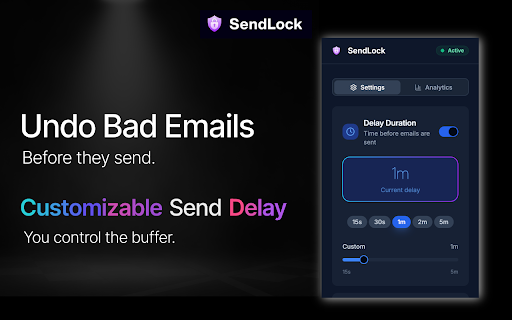


About
Ever hit send and immediately wish you could take it back?

SendLock is a Gmail Chrome extension that adds a customizable delay after you hit send. During that buffer, you can stop the email, reopen it, make changes, and resend it when you are ready. It is like an undo send button that actually gives you enough time to catch your mistake.

WHY SENDLOCK EXISTS:
Gmail has a small undo notification that appears for a few seconds after you send. But that is not a review window. It is a countdown. By the time you realize something is wrong, it is already gone.

SendLock is different. It holds your email in a real pause before it ever leaves your inbox. You choose how long that delay lasts. During that window, you can stop the email, reopen it, fix whatever needs fixing, and send it again when you are ready. It is not a notification you have to race against. It is a buffer you control.

WHAT IT CATCHES
SendLock helps you prevent the email mistakes that cost money, trust, and relationships:

Sending an email to the wrong person or replying all by accident
Forgetting to attach a file before hitting send
Including wrong pricing, incorrect numbers, or outdated information
Responding emotionally or too quickly to a difficult message
Sending a message with typos, errors, or a careless tone
Emailing a client, customer, or executive before fully reviewing your message

BUILT FOR PROFESSIONALS WHO CANNOT AFFORD MISTAKES
SendLock is designed for anyone whose emails carry real consequences: sales teams sending proposals and pricing, account managers communicating with clients, executives representing their company, finance teams handling sensitive numbers, recruiters making first impressions, operations teams managing approvals and contracts, and customer success teams protecting key relationships.
If a single bad email could cost you a deal, a customer, or your credibility, SendLock is built for you.

HOW IT WORKS
Install SendLock from the Chrome Web Store. One click. No setup. No training.
Compose and send emails in Gmail exactly like you always do.
After you hit send, SendLock holds the email for your chosen delay period.
During that window, you can stop the email, fix it, and resend. Or just let it go.

That is it. No complicated settings. No dashboard to learn. It works quietly in the background and protects you every time you hit send.

YOUR DATA STAYS PRIVATE
SendLock never reads your emails. Never stores your emails. Your messages never leave Gmail. We simply delay the send. SendLock is CASA Security Certified, passing Google's security analysis on the first attempt with one of the highest possible scores.

SIMPLE PRICING
Free 7-day trial. No credit card required. Individual and team plans available at SendLock.com.

STOP WORRYING ABOUT EVERY SEND
Most email mistakes are not dramatic. But they still hurt. A wrong name in a proposal. An emotional reply you regret ten minutes later. Pricing that was supposed to be updated before it went out. These are the mistakes that quietly damage trust, credibility, and revenue every day.

SendLock gives you a second chance on every email. Install it in one click and send with confidence.

Questions or feedback? Email us at [email protected]

SendLock FREQUENTLY ASKED QUESTIONS

Does SendLock read or store my emails?
No. SendLock never reads, scans, or stores your emails. Your messages never leave Gmail. SendLock simply delays the send so you have time to review, stop, or edit before the email goes out. We are CASA Security Certified, meaning our extension passed rigorous security analysis with one of the highest possible scores.

How is SendLock different from Gmail's built-in undo send?
Gmail shows a small notification for a few seconds after you send. But that is not a review window. It is a countdown, and by the time you realize a mistake, it is already gone. SendLock holds your email in a real pause before it ever leaves your inbox. You control how long that pause lasts, and during that time you can stop the email, reopen it, fix it, and resend when you are ready. It is not a notification you race against. It is a buffer you control.

Can I customize the delay time?
Yes. You choose how long SendLock holds your emails after you hit send. Set the delay that fits your workflow and change it anytime.

Does SendLock work with Google Workspace and business Gmail accounts?
Yes. SendLock works with both personal Gmail and Google Workspace accounts. If you use Gmail in Chrome, SendLock works for you.

Will SendLock slow down my Gmail?
No. SendLock is lightweight and runs quietly in the background. You will not notice any difference in how Gmail loads or performs. The only thing that changes is that your emails are held for your chosen delay before being sent.

What happens if I do not stop the email during the delay?
It sends normally. SendLock only pauses the email for your chosen window. If you do not take any action, the email goes out automatically once the delay ends. No extra clicks required.

Does it work on every email I send?
Yes. SendLock protects every email you send from Gmail in Chrome. You do not need to turn it on or remember to activate it. Once installed, it runs automatically on every send.

Is there a plan for teams or companies?
Yes. SendLock offers both individual and team plans. If you want to protect your whole sales team, account management group, or organization, team pricing is available at SendLock.com. One bad email from anyone on your team can cost a deal or a relationship. SendLock gives your entire team the same layer of protection.

How do I install SendLock?
One click from this page. Click "Add to Chrome," and SendLock starts working immediately in Gmail. No setup. No training. No IT department required.

What if I want a refund?
SendLock comes with a guarantee. If you do not have at least one "I'm glad I caught that" moment, we will refund every dollar. No questions asked.

If you have any questions or feedback please email us at [email protected]
Technical
- Version
- 1.1.16
- Manifest
- V3
- Size
- 1.23MiB
- Min Chrome
- 88
- Languages
- 1
- Featured
- No
Metadata
- ID
- adfljjahgffnhojealealnnkjelpkcne
- Developer ID
- ua46d97dac0f0c6bd6b0b0d262eead32a
- Developer Email
- [email protected]
- Created
- Aug 15, 2025
- Last Updated (Store)
- Jun 5, 2026
- Last Scraped
- Jun 14, 2026
- Website
- sendlock.com
- Support URL
- sendlock.com/support
- Privacy Policy
- http://sendlock.com/privacy
Data sourced from the Chrome Web Store · last verified Jun 14, 2026.