
Webarchive Viewer and Convert to PDF
View a Webarchive file without having Apple Mac, Safari installed on the machine. Convert your Webarchive files to PDF/Zipped HTML.
As of June 2026, Webarchive Viewer and Convert to PDF has 8,000 users and a 2.33/5 rating from 27 reviews.
Usersdown 11.1 percent−11.1%
8.0K
8,000
Ratingno change0%
2.33
27 reviews
Reviewsno change0%
27
Version
1.0.1.2
Manifest V2
90-day change · In the last 90 days this extension lost 1.0K users.
History
2 snapshotsTracking since May 2, 2026.
View as table
| Date | Users | Rating | Reviews | Version |
|---|---|---|---|---|
| May 2, 2026 | 9.0K | 2.33 | 27 | 1.0.1.2 |
| Jun 1, 2026 | 9.0K | 2.33 | 27 | 1.0.1.2 |
| Now | 8.0K | 2.33 | 27 | 1.0.1.2 |
Permissions & access
- Permissions
- unlimitedStorage
- Host access
- None declared
Screenshots
About
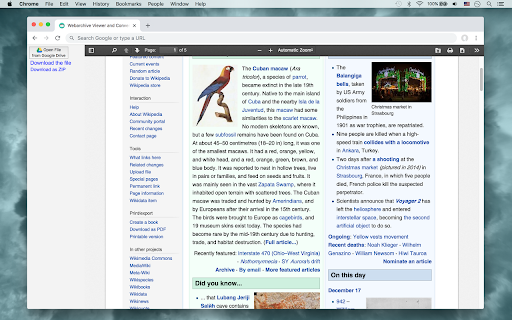
This Webarchive Viewer allows you to view a Webarchive file without having Apple Mac, Safari installed on the machine. You can easily convert your Webarchive (Apple, Safari) files to PDF/Zipped HTML with this tool.
This app makes viewing Webarchive file quick and easy.
This also provides Webarchive to HTML format conveting. You can download the extracted HTML files.
You can open a Webarchive file to view from your computer or your Google Drive.

The webarchive file format is available on macOS and Windows for saving and reviewing complete web pages using the Safari web browser. The webarchive format differs from a standalone HTML file because it also saves linked files such as images, CSS, and JavaScript.
Technical
- Version
- 1.0.1.2
- Manifest
- V2
- Size
- 10.17KiB
- Min Chrome
- —
- Languages
- 1
- Featured
- No
Metadata
- ID
- adegpgilpagmbmgjlkaalcalginmdcpi
- Developer ID
- u7bde86e60b54ce73e33699529a6dd2ea
- Developer Email
- [email protected]
- Created
- Dec 18, 2018
- Last Updated (Store)
- Dec 18, 2018
- Last Scraped
- Jun 1, 2026
- Support URL
- —
- Privacy Policy
- —
Similar extensions
Alternatives to Webarchive Viewer and Convert to PDF, ranked by description similarity.

Web Archiver
Archive any authenticated website as self-contained HTML files — inlines CSS, fonts, images, and scripts.
14

Web Archive Explorer
Check and create web archives across multiple archiving services
244
★ 5.0

HAR Viewer with Drive
HAR Viewer is a app that allows to visualize HTTP tracing logs based on HTTP Archive format (HAR).
1.0K
★ 4.2

Web Archive Navigator
Access cached and archived webpage versions instantly via right-click menu
11

CHM, HLP Viewer and Extractor
This app allows you to view a CHM, HLP file without having Windows installed. Convert CHM, HLP files to Zipped HTML/RTF format.
3.0K
★ 2.9

Web Archives
View archived and cached versions of web pages on various search engines, such as the Wayback Machine and Archive.is.
70.0K
★ 4.8

HEIC Image Viewer Decoder
This app allows you to view and decode directly HEIC, HEIF images in your browser, and Save as a PNG, JPEG file format.
10.0K
★ 3.4

News Article Viewer
Read news articles for free
31
★ 5.0
Data sourced from the Chrome Web Store · last verified Jun 1, 2026.