
Simple Search and Replace
Extension to search and replace text in input and textarea tags
As of June 2026, Simple Search and Replace has 1,000 users and a 3.10/5 rating from 10 reviews in the Productivity category.
Usersno change0%
1.0K
1,000
Ratingno change0%
3.10
10 reviews
Reviewsno change0%
10
Version
1.0
Manifest V3
Permissions & access
- Permissions
- storageactiveTab
- Host access
- None declared
Screenshots
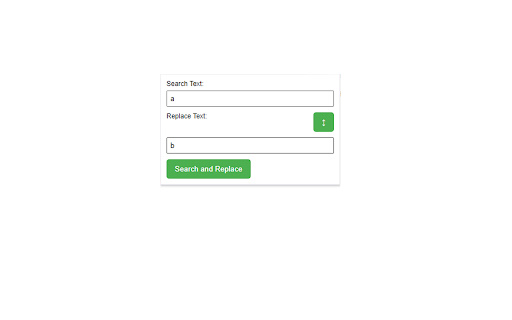
About
The Simple Search and Replace extension for Google Chrome is a powerful tool that allows you to quickly search and replace text within input and textarea tags on web pages. With flexible customization options, this extension is a handy tool for efficiently performing text editing operations.

Key Features:
Quick Search: Swiftly search for text within input and textarea tags on web pages.

Flexible Replacement: Execute replacement operations with flexible options, including one-time or global replacement, case sensitivity options, and more.

Advanced Customization: Provide a variety of customization options to meet your specific needs, including advanced search and replace options.

Save Settings: The extension automatically saves your settings, saving you time when reusing them.

Benefits:
Time-Saving: Perform search and replace text operations quickly and effectively.

Seamless Integration: Operates directly within the Chrome browser without complex steps.

High Customization: Easily tailor settings to suit your specific requirements.

How to Use:
Open the web page where you want to perform the search and replace operation.
Click on the extension icon in the Chrome toolbar.
Enter the text you want to search for and replace.
Select the necessary options.
Click the "Search and Replace" button to complete the operation.
Easy to customize and use, the Simple Search and Replace extension helps you manage content on web pages quickly and efficiently.
Technical
- Version
- 1.0
- Manifest
- V3
- Size
- 44.46KiB
- Min Chrome
- 88
- Languages
- 1
- Featured
- No
Metadata
- ID
- adanjlhcpgdnjadfkdjlccnkdfoiccbe
- Developer ID
- u0458b45432d66063529ed1d4b182e859
- Developer Email
- [email protected]
- Created
- Feb 1, 2024
- Last Updated (Store)
- Feb 1, 2024
- Last Scraped
- Jun 1, 2026
- Website
- —
- Support URL
- —
Similar extensions
Alternatives to Simple Search and Replace, ranked by description similarity.

Search and Replace
Provides custom search & replace for editable elements on a webpage.
51
★ 2.3

Find and Replace in Documents
Paste or load text, then run find‑and‑replace right inside Chrome.
94

Select & Right Click Search
Search selected text with various search engines via right-click menu
75
★ 5.0

Find and Replace
Find and replace text on any web page, including popups and Shadow DOM inputs.
117
★ 5.0

Search For
Search for the highlighted text on any webpage without having to switch between tabs or applications.
4
Select and Search
Select and Search on Google
6

Search in Another Tab
Search selected text on Google in a new tab - Displays a quick search button when you select text.
3
★ 5.0

Locate
Advanced page search with regex, CSS selectors, search & replace, and AI-powered features
15
Data sourced from the Chrome Web Store · last verified Jun 1, 2026.