
Design Extractor
Extract and analyze website design systems using AI
As of June 2026, Design Extractor has 171 users in the Productivity category.
Usersno change0%
171
171
Ratingno change0%
—
— reviews
Reviewsno change0%
—
Version
2.0.9
Manifest V3
90-day change · In the last 90 days this extension 3 version updates.
History
8 snapshotsTracking since Apr 29, 2026.
View as table
| Date | Users | Rating | Reviews | Version |
|---|---|---|---|---|
| Apr 29, 2026 | — | — | — | 2.0.5 |
| May 6, 2026 | — | — | — | 2.0.5 |
| May 11, 2026 | 36 | — | — | 2.0.5 |
| May 17, 2026 | 76 | — | — | 2.0.7 |
| May 23, 2026 | 108 | — | — | 2.0.7 |
| May 30, 2026 | 122 | — | — | 2.0.8 |
| Jun 5, 2026 | 146 | — | — | 2.0.9 |
| Jun 13, 2026 | 153 | — | — | 2.0.9 |
| Now | 171 | — | — | 2.0.9 |
Permissions & access
- Permissions
- activeTabscriptingstoragesidePaneldownloadstabs
- Host access
- <all_urls>, https://api.getwebdesign.top/*
Screenshots


About
🎨 Design Extractor — Turn Any Website Into a Design Doc

Love a website's look? Copy it in 30 seconds.

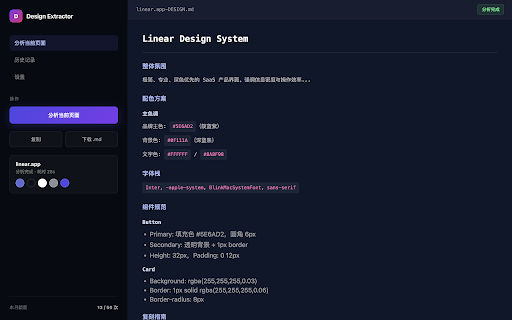
Design Extractor is a Chrome extension that analyzes any webpage and instantly creates a structured DESIGN.md file. No need to dig through DevTools or guess CSS values. One click, and AI does the heavy lifting for you.

---

 ⚡ What It Does

Click "Analyze This Page" and Design Extractor will:

🔍 Scan the code — Grabs all CSS variables, fonts, colors, spacing, shadows, and animations
📸 Take smart screenshots — Captures the top, middle, and bottom of the page so the AI "sees" the design
🤖 Write a full design doc — Generates a clean Markdown file covering the vibe, colors, typography, components, and how to rebuild it
💾 Export in one tap — Copy to clipboard or download as `{website}_DESIGN.md`

---

 👤 Who Is It For

- Indie hackers & devs — Feed design specs straight into Cursor, Copilot, or v0. No more "make it look like Linear" guesswork.
- Designers — Steal like an artist. Analyze competitors and build your own teardown library in minutes.
- Founders & PMs — Show your team exactly what you want, with real specs instead of vague references.
- Frontend engineers — Stop inspecting elements one by one. Get the full system in a single file.

---

 ✨ Key Features

One-click analysis on any HTTPS page
Extracts colors, fonts, spacing, shadows, gradients, animations, and component styles
AI-powered with visual context from 3 auto-captured screenshots
Real-time streaming output — watch the doc write itself
OpenAI-compatible — Bring your own key (Kimi, GPT-4o, and more)
Local-first privacy — Your API key stays in your browser, never on our servers

---

 💰 Pricing

Free — $0, unlimited with your own API key
Pro — $5/month for 50 analyses (or use your own key)
Max — $20/month for 200 analyses (or use your own key)

---

 🔒 Privacy First

Built on Manifest V3 with zero extra dependencies. Your API key is stored locally in chrome.storage.local and never touches our servers. Use your own key and the extension works entirely offline.

---

 🚀 Get Started in 30 Seconds

1. Install Design Extractor from the Chrome Web Store
2. Add your API key in Settings (or log in for Pro/Max)
3. Visit any website and click the extension icon
4. Hit Analyze This Page
5. Download your DESIGN.md and start building

---

Design Extractor — Because great design shouldn't be a mystery.
Technical
- Version
- 2.0.9
- Manifest
- V3
- Size
- 75.18KiB
- Min Chrome
- 88
- Languages
- 1
- Featured
- No
Metadata
- ID
- adahpanfaajdfhddlaeplmkfnpnbkkke
- Developer ID
- u09810ec93edbb4b1b15b1377a06055e3
- Developer Email
- [email protected]
- Created
- Apr 28, 2026
- Last Updated (Store)
- May 29, 2026
- Last Scraped
- Jun 13, 2026
- Website
- getwebdesign.top
- Support URL
- https://getwebdesign.top/features
- Privacy Policy
- https://getwebdesign.top/privacy
Data sourced from the Chrome Web Store · last verified Jun 13, 2026.