
letsgoPDF
The fast, friendly PDF toolkit — right in your side panel.
As of June 2026, letsgoPDF has 12 users and a 5.00/5 rating from 2 reviews in the Workflow & Planning category.
Usersno change0%
12
12
Ratingno change0%
5.00
2 reviews
Reviewsno change0%
2
Version
0.4.3
Manifest V3
90-day change · In the last 90 days this extension 4 version updates.
History
7 snapshotsTracking since Apr 24, 2026.
View as table
| Date | Users | Rating | Reviews | Version |
|---|---|---|---|---|
| Apr 24, 2026 | — | — | — | 0.1.1 |
| May 1, 2026 | — | — | — | 0.1.1 |
| May 7, 2026 | — | — | — | 0.3.0 |
| May 17, 2026 | 8 | 5.00 | 1 | 0.4.0 |
| May 24, 2026 | 8 | 5.00 | 2 | 0.4.1 |
| May 31, 2026 | 10 | 5.00 | 2 | 0.4.3 |
| Jun 6, 2026 | 11 | 5.00 | 2 | 0.4.3 |
| Now | 12 | 5.00 | 2 | 0.4.3 |
Changelog
- May 24, 2026description
🆕 Smart Redact, Bates numbering, and PDF → Markdown — three free
features no other PDF extension bundles together. Plus AI Chat,
Summarize, and Translate (Pro). All in your Chrome side panel.

═══ WHAT MAKES letsgoPDF DIFFERENT ═══

✦ Smart Redact (free)
Auto-detect emails, phone numbers, US SSNs, credit cards (with Luhn
validation), IBANs, and dates of birth — then black them out in one
click. Custom phrases too. Document metadata (author, title,
keywords) is stripped automatically. Most PDF tools only offer manual
redaction; we find the PII for you.

✦ Bates numbering (free)
Sequential page labels (ABC0001, ABC0002, …) for legal discovery.
Configurable prefix, start number, padding digits, position, and
font size. Standard in every law firm; missing from every other
PDF extension.

✦ PDF → Markdown (free)
Convert any PDF into clean, properly-formatted Markdown with
headings, lists, tables, and bold/italic preserved. Drop the
output straight into Notion, Obsidian, GitHub, or any markdown
editor. iLovePDF and Smallpdf give you Word; we give you what
you actually want.

✦ AI tools (Pro · letsgopdf.app)
- Chat with PDF — ask anything in plain English, get answers
  with clickable page citations
- Summarize PDF — TL;DR or detailed outline, pick length + style
- Translate PDF — to 30+ languages, native script preserved
The full AI experience runs on letsgopdf.app where the side-by-
side preview pane is wider; tools open straight from the
extension's queue.

═══ STANDARD PDF TOOLKIT (FREE) ═══

✓ Merge multiple PDFs in any order
✓ Split a PDF by page ranges
✓ Rotate pages 90° / 180° / 270°
✓ Sign PDFs with a signature image (your file never uploaded)
✓ Compress to shrink file size
✓ Password-protect with a custom password
✓ Convert PDF → Word, Excel, PowerPoint, JPG/PNG
✓ Convert Word, Excel, PowerPoint, images → PDF
✓ OCR scanned PDFs

═══ PRIVACY-FIRST ═══

Merge, split, rotate, sign, redact, and Bates numbering all run
100% in your browser via WebAssembly. Your files never leave your
device for these actions. iLovePDF, Smallpdf, and PDFgear upload
everything to their servers; we don't.

For format conversions and AI features (which need server compute)
we use Vercel + Anthropic. No third-party trackers, no ads, no
analytics on your file content.

═══ HOW TO USE ═══

1. Click the letsgoPDF icon to open the side panel.
2. Drag a PDF in or click to browse.
3. Pick an action — Smart Redact, Bates, To Markdown, or any of
   the standard tools.
4. Done. Files download straight to your computer.

For Pro features (AI chat / summarize / translate, plus 200/mo
backend conversions), sign up on letsgopdf.app and click the
"Sign in" link in the extension footer to link your account —
your tier is recognized instantly across both surfaces.

═══ PRICING ═══

🆓 Free — unlimited Smart Redact, Bates, Markdown, merge, split,
rotate, sign, images→PDF + 10 backend conversions per month.

⭐ Pro — $5/mo — 200 backend conversions/mo, 50 Chat-with-PDF
questions, 20 Summarize runs, 20 Translate runs, larger files,
priority processing.

🚀 Premium — $15/mo — unlimited everything.

═══ LINKS ═══

Web app: https://letsgopdf.app
Pricing: https://letsgopdf.app/pricing
Privacy: https://letsgopdf.app/privacy

Operated by Korel.
🆕 Edit PDFs, Smart Redact PII, Bates numbering, and PDF → Markdown —
four free features no other PDF extension bundles together. Plus AI
Chat, Summarize, and Translate (Pro). All in your Chrome side panel.

═══ WHAT MAKES letsgoPDF DIFFERENT ═══

✦ Edit PDF (free · letsgopdf.app)
Add text boxes, typed signatures, today's date, PNG/JPG images,
whiteout rectangles, or replace existing text (drag to cover + retype
in one motion). No watermark, no signup, no upload — files stay in
your browser. Opens straight from the extension's PDF queue; the
editor itself runs on letsgopdf.app where the canvas has room for a
real preview.

✦ Smart Redact (free)
Auto-detect emails, phone numbers, US SSNs, credit cards (with Luhn
validation), IBANs, and dates of birth — then black them out in one
click. Custom phrases too. Document metadata (author, title,
keywords) is stripped automatically. Most PDF tools only offer manual
redaction; we find the PII for you.

✦ Bates numbering (free)
Sequential page labels (ABC0001, ABC0002, …) for legal discovery.
Configurable prefix, start number, padding digits, position, and
font size. Standard in every law firm; missing from every other
PDF extension.

✦ PDF → Markdown (free)
Convert any PDF into clean, properly-formatted Markdown with
headings, lists, tables, and bold/italic preserved. Drop the
output straight into Notion, Obsidian, GitHub, or any markdown
editor. iLovePDF and Smallpdf give you Word; we give you what
you actually want.

✦ AI tools (Pro · letsgopdf.app)
- Chat with PDF — ask anything in plain English, get answers
  with clickable page citations
- Summarize PDF — TL;DR or detailed outline, pick length + style
- Translate PDF — to 20+ languages, native script preserved
The full AI experience runs on letsgopdf.app where the side-by-
side preview pane is wider; tools open straight from the
extension's queue.

═══ STANDARD PDF TOOLKIT (FREE) ═══

✓ Merge multiple PDFs in any order
✓ Split a PDF by page ranges
✓ Rotate pages 90° / 180° / 270°
✓ Sign PDFs with a signature image (your file never uploaded)
✓ Compress to shrink file size
✓ Password-protect with a custom password
✓ Convert PDF → Word, Excel, PowerPoint, JPG/PNG
✓ Convert Word, Excel, PowerPoint, images → PDF
✓ OCR scanned PDFs

═══ PRIVACY-FIRST ═══

Merge, split, rotate, sign, redact, Bates numbering, PDF → Markdown,
and Edit PDF all run 100% in your browser. Your files never leave
your device for these actions. iLovePDF, Smallpdf, and PDFgear upload
everything to their servers; we don't.

For format conversions and AI features (which need server compute)
we use Vercel + Anthropic. No third-party trackers, no ads, no
analytics on your file content.

═══ HOW TO USE ═══

1. Click the letsgoPDF icon to open the side panel.
2. Drag a PDF in or click to browse.
3. Pick an action — Edit PDF, Smart Redact, Bates, To Markdown, or
   any of the standard tools.
4. Done. Files download straight to your computer.

For Pro features (AI chat / summarize / translate, plus 200/mo
backend conversions), sign up on letsgopdf.app and click the
"Sign in" link in the extension footer to link your account —
your tier is recognized instantly across both surfaces.

═══ PRICING ═══

🆓 Free — unlimited Edit PDF, Smart Redact, Bates, Markdown, merge,
split, rotate, sign, images→PDF + 10 backend conversions per month.

⭐ Pro — $5/mo — 200 backend conversions/mo, 50 Chat-with-PDF
questions, 20 Summarize runs, 20 Translate runs, larger files,
priority processing.

🚀 Premium — $15/mo — unlimited everything.

═══ LINKS ═══

Web app: https://letsgopdf.app
Pricing: https://letsgopdf.app/pricing
Privacy: https://letsgopdf.app/privacy

Operated by Korel.
- May 1, 2026description
letsgoPDF is a lean, privacy-respecting PDF toolkit that lives in Chrome's side panel. Open it, drop a file, pick an action — no trip to a website, no sign-up.

● RUNS IN YOUR BROWSER (free, unlimited)
• Merge multiple PDFs into one
• Split a PDF by page ranges (e.g. 1-8, 9-16, 17-end)
• Rotate all pages 90° / 180° / 270°
• Sign a PDF — typed signature or your own uploaded signature image
• Images → PDF (JPG, PNG, WEBP, GIF)

● BACKED BY A CONVERSION SERVICE (10 free / month)
• Compress PDF
• Password-protect PDF
• OCR (scanned PDF → searchable)
• PDF → Word / Excel / PowerPoint / Images
• Word / Excel / PowerPoint → PDF

● PDF DETECTION
When you have a PDF open in the active tab, letsgoPDF notices and offers one-click actions on it.

● PRIVACY
In-browser actions (merge, split, sign, rotate, images→PDF) never leave your device. Server-backed actions upload your file directly to our conversion partner over HTTPS; letsgoPDF does not keep a copy. Waitlist emails (optional) are stored privately and used only to tell you when the paid plan launches.

Full privacy policy: https://github.com/siqbalbaloch-creator/letsgopdf-chrome/blob/main/PRIVACY.md
Source code: https://github.com/siqbalbaloch-creator/letsgopdf-chrome
🆕 Smart Redact, Bates numbering, and PDF → Markdown — three free
features no other PDF extension bundles together. Plus AI Chat,
Summarize, and Translate (Pro). All in your Chrome side panel.

═══ WHAT MAKES letsgoPDF DIFFERENT ═══

✦ Smart Redact (free)
Auto-detect emails, phone numbers, US SSNs, credit cards (with Luhn
validation), IBANs, and dates of birth — then black them out in one
click. Custom phrases too. Document metadata (author, title,
keywords) is stripped automatically. Most PDF tools only offer manual
redaction; we find the PII for you.

✦ Bates numbering (free)
Sequential page labels (ABC0001, ABC0002, …) for legal discovery.
Configurable prefix, start number, padding digits, position, and
font size. Standard in every law firm; missing from every other
PDF extension.

✦ PDF → Markdown (free)
Convert any PDF into clean, properly-formatted Markdown with
headings, lists, tables, and bold/italic preserved. Drop the
output straight into Notion, Obsidian, GitHub, or any markdown
editor. iLovePDF and Smallpdf give you Word; we give you what
you actually want.

✦ AI tools (Pro · letsgopdf.app)
- Chat with PDF — ask anything in plain English, get answers
  with clickable page citations
- Summarize PDF — TL;DR or detailed outline, pick length + style
- Translate PDF — to 30+ languages, native script preserved
The full AI experience runs on letsgopdf.app where the side-by-
side preview pane is wider; tools open straight from the
extension's queue.

═══ STANDARD PDF TOOLKIT (FREE) ═══

✓ Merge multiple PDFs in any order
✓ Split a PDF by page ranges
✓ Rotate pages 90° / 180° / 270°
✓ Sign PDFs with a signature image (your file never uploaded)
✓ Compress to shrink file size
✓ Password-protect with a custom password
✓ Convert PDF → Word, Excel, PowerPoint, JPG/PNG
✓ Convert Word, Excel, PowerPoint, images → PDF
✓ OCR scanned PDFs

═══ PRIVACY-FIRST ═══

Merge, split, rotate, sign, redact, and Bates numbering all run
100% in your browser via WebAssembly. Your files never leave your
device for these actions. iLovePDF, Smallpdf, and PDFgear upload
everything to their servers; we don't.

For format conversions and AI features (which need server compute)
we use Vercel + Anthropic. No third-party trackers, no ads, no
analytics on your file content.

═══ HOW TO USE ═══

1. Click the letsgoPDF icon to open the side panel.
2. Drag a PDF in or click to browse.
3. Pick an action — Smart Redact, Bates, To Markdown, or any of
   the standard tools.
4. Done. Files download straight to your computer.

For Pro features (AI chat / summarize / translate, plus 200/mo
backend conversions), sign up on letsgopdf.app and click the
"Sign in" link in the extension footer to link your account —
your tier is recognized instantly across both surfaces.

═══ PRICING ═══

🆓 Free — unlimited Smart Redact, Bates, Markdown, merge, split,
rotate, sign, images→PDF + 10 backend conversions per month.

⭐ Pro — $5/mo — 200 backend conversions/mo, 50 Chat-with-PDF
questions, 20 Summarize runs, 20 Translate runs, larger files,
priority processing.

🚀 Premium — $15/mo — unlimited everything.

═══ LINKS ═══

Web app: https://letsgopdf.app
Pricing: https://letsgopdf.app/pricing
Privacy: https://letsgopdf.app/privacy

Operated by Korel.
- May 1, 2026category
productivity/tools
productivity/workflow
Permissions & access
- Permissions
- sidePaneltabsstorage
- Host access
- None declared
Screenshots


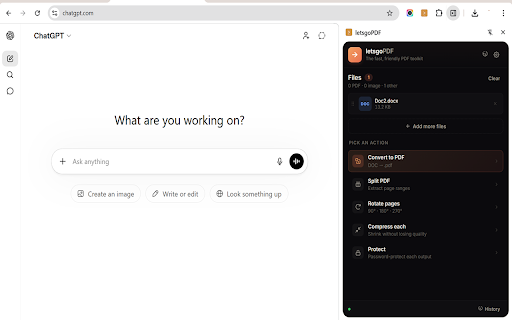

About
🆕 Edit PDFs, Smart Redact PII, Bates numbering, and PDF → Markdown —
four free features no other PDF extension bundles together. Plus AI
Chat, Summarize, and Translate (Pro). All in your Chrome side panel.

═══ WHAT MAKES letsgoPDF DIFFERENT ═══

✦ Edit PDF (free · letsgopdf.app)
Add text boxes, typed signatures, today's date, PNG/JPG images,
whiteout rectangles, or replace existing text (drag to cover + retype
in one motion). No watermark, no signup, no upload — files stay in
your browser. Opens straight from the extension's PDF queue; the
editor itself runs on letsgopdf.app where the canvas has room for a
real preview.

✦ Smart Redact (free)
Auto-detect emails, phone numbers, US SSNs, credit cards (with Luhn
validation), IBANs, and dates of birth — then black them out in one
click. Custom phrases too. Document metadata (author, title,
keywords) is stripped automatically. Most PDF tools only offer manual
redaction; we find the PII for you.

✦ Bates numbering (free)
Sequential page labels (ABC0001, ABC0002, …) for legal discovery.
Configurable prefix, start number, padding digits, position, and
font size. Standard in every law firm; missing from every other
PDF extension.

✦ PDF → Markdown (free)
Convert any PDF into clean, properly-formatted Markdown with
headings, lists, tables, and bold/italic preserved. Drop the
output straight into Notion, Obsidian, GitHub, or any markdown
editor. iLovePDF and Smallpdf give you Word; we give you what
you actually want.

✦ AI tools (Pro · letsgopdf.app)
- Chat with PDF — ask anything in plain English, get answers
  with clickable page citations
- Summarize PDF — TL;DR or detailed outline, pick length + style
- Translate PDF — to 20+ languages, native script preserved
The full AI experience runs on letsgopdf.app where the side-by-
side preview pane is wider; tools open straight from the
extension's queue.

═══ STANDARD PDF TOOLKIT (FREE) ═══

✓ Merge multiple PDFs in any order
✓ Split a PDF by page ranges
✓ Rotate pages 90° / 180° / 270°
✓ Sign PDFs with a signature image (your file never uploaded)
✓ Compress to shrink file size
✓ Password-protect with a custom password
✓ Convert PDF → Word, Excel, PowerPoint, JPG/PNG
✓ Convert Word, Excel, PowerPoint, images → PDF
✓ OCR scanned PDFs

═══ PRIVACY-FIRST ═══

Merge, split, rotate, sign, redact, Bates numbering, PDF → Markdown,
and Edit PDF all run 100% in your browser. Your files never leave
your device for these actions. iLovePDF, Smallpdf, and PDFgear upload
everything to their servers; we don't.

For format conversions and AI features (which need server compute)
we use Vercel + Anthropic. No third-party trackers, no ads, no
analytics on your file content.

═══ HOW TO USE ═══

1. Click the letsgoPDF icon to open the side panel.
2. Drag a PDF in or click to browse.
3. Pick an action — Edit PDF, Smart Redact, Bates, To Markdown, or
   any of the standard tools.
4. Done. Files download straight to your computer.

For Pro features (AI chat / summarize / translate, plus 200/mo
backend conversions), sign up on letsgopdf.app and click the
"Sign in" link in the extension footer to link your account —
your tier is recognized instantly across both surfaces.

═══ PRICING ═══

🆓 Free — unlimited Edit PDF, Smart Redact, Bates, Markdown, merge,
split, rotate, sign, images→PDF + 10 backend conversions per month.

⭐ Pro — $5/mo — 200 backend conversions/mo, 50 Chat-with-PDF
questions, 20 Summarize runs, 20 Translate runs, larger files,
priority processing.

🚀 Premium — $15/mo — unlimited everything.

═══ LINKS ═══

Web app: https://letsgopdf.app
Pricing: https://letsgopdf.app/pricing
Privacy: https://letsgopdf.app/privacy

Operated by Korel.
Technical
- Version
- 0.4.3
- Manifest
- V3
- Size
- 812KiB
- Min Chrome
- 88
- Languages
- 1
- Featured
- No
Metadata
- ID
- acohgbcgonfjbgoeolkcjfhmmnjkmnlp
- Developer ID
- u928415e23bf6e3a8469c2fe887cb4fe4
- Developer Email
- [email protected]
- Created
- Apr 23, 2026
- Last Updated (Store)
- May 19, 2026
- Last Scraped
- Jun 6, 2026
- Website
- letsgopdf.app
- Support URL
- https://letsgopdf.app
- Privacy Policy
- https://letsgopdf-chrome.vercel.app/privacy.html
Data sourced from the Chrome Web Store · last verified Jun 6, 2026.