
RespondR - Your customer support assistant on Whatsapp Web
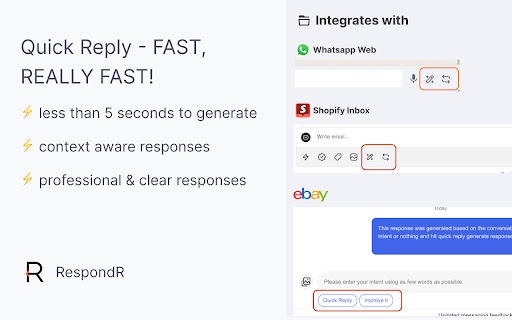
Respond to customer queries promptly on platforms like Shopify Inbox, Whatsapp Web, eBay.
As of June 2026, RespondR - Your customer support assistant on Whatsapp Web has 35 users in the Productivity category.
Usersup 6.1 percent+6.1%
35
35
Ratingno change0%
—
— reviews
Reviewsno change0%
—
Version
1.0.11
Manifest V3
History
3 snapshotsTracking since Apr 1, 2026.
View as table
| Date | Users | Rating | Reviews | Version |
|---|---|---|---|---|
| Apr 1, 2026 | 33 | — | — | 1.0.11 |
| May 2, 2026 | 32 | — | — | 1.0.11 |
| Jun 7, 2026 | 37 | — | — | 1.0.11 |
| Now | 35 | — | — | 1.0.11 |
Permissions & access
- Permissions
- None declared
- Host access
- *://*.ebay.com/*, *://*.ebay.co.uk/*, *://*.ebay.de/*, *://*.ebay.com.au/*, *://*.ebay.ca/*, https://inbox.shopify.com/*
Screenshots
About
RespondR streamlines your communication process on Whatsapp web, eBay and Shopify, making it faster and easier to respond to user queries professionally and with clarity.

How to Use RespondR with Whatsapp Web:
Use RespondR's add-on buttons to quickly respond to user queries.

Steps to Use RespondR:

   - Login to Whatsapp Web Inbox : https://web.whatsapp.com/
   - Click on any user chat, and RespondR will load with extra button ( magic wand icon and revise icon ).
   - Generate Quick Replies: Hit the "Magic Wand icon" to generate an instant response. Or write your intent and then let respondR generate the professional response for you
   - Improve Existing Messages: If you have already written a message and want to check the grammar and improve it further, click the "revise icon".

How to Use RespondR with eBay:
Use RespondR's add-on buttons to quickly respond to user queries. Alternatively, write your intent and let RespondR assist with generating responses or fixing grammar issues effortlessly.

Steps to Use RespondR:

   - Login to eBay Website
   - Go to the messages section (make sure you are using the new UI of eBay messages).
   - Click on any user message, and RespondR will load with extra buttons at the bottom of screen.
   - Generate Quick Replies: Hit the "Quick Reply" button to generate an instant response.
Alternatively, write your intent and hit the "Quick Reply" button to generate a suitable response in seconds.
   - Improve Existing Messages: If you have already written a message and want to check the grammar and improve it further, click the "Improve It" button.
   - Voice input : Voice input responses using the Microphone Icon.
   - Canned Responses: Save and reuse common replies with Canned Responses.


How to Use RespondR with Shopify:
Use RespondR's add-on buttons to quickly respond to user queries.

Steps to Use RespondR:

   - Login to Shopify Inbox : https://inbox.shopify.com/
   - Click on any user chat, and RespondR will load with extra button ( magic wand icon ).
   - Generate Quick Replies: Hit the "Magic Wand icon" to generate an instant response. Or write your intent and then let respondR generate the professional response for you
   - Improve Existing Messages: If you have already written a message and want to check the grammar and improve it further, click the "revise icon".
Technical
- Version
- 1.0.11
- Manifest
- V3
- Size
- 111KiB
- Min Chrome
- 88
- Languages
- 1
- Featured
- No
Metadata
- ID
- acngjlcapibifmoaggciknahaljbnmie
- Developer ID
- u106c438e9d4e5bda550bf56a01267a75
- Developer Email
- [email protected]
- Created
- Jul 1, 2024
- Last Updated (Store)
- May 23, 2026
- Last Scraped
- Jun 7, 2026
- Website
- —
- Support URL
- —
- Privacy Policy
- https://mirrorlab.app/privacy
Similar extensions
Alternatives to RespondR - Your customer support assistant on Whatsapp Web, ranked by description similarity.

Reply2Box
Your AI Reply Buddy for Any Text Box in Your Browser
6
★ 5.0

SmartDM.io: Boost Whatsapp Web with CRM using ChatGPT
WhatsApp CRM with AI Auto-Reply - Now with seamless website integration
9
★ 5.0

Saleschat.pro
Saleschat.pro Extension
12
★ 5.0

Agent for WhatsApp
Agent for WhatsApp: automate replies and workflows
26
★ 5.0

WhatsApp Web Copilot - AI for Quick Replies
Reply faster and more professionally on WhatsApp Web with smart AI suggestions.
10

Replero: AI for Etsy Messages
Craft, refine, and personalize your Etsy messages in seconds. Save time, reduce stress, and earn better reviews—right inside Etsy.
39
★ 5.0

Tiktok & WhatsApp AI辅助回复
Professional AI reply assistant for TikTok & WhatsApp.
290
★ 5.0

VYROX AutoWhatsApp
Auto-reply to WhatsApp messages using Google Gemini AI
16
Data sourced from the Chrome Web Store · last verified Jun 7, 2026.