
Memex
Search, annotate and organize what you've read online.
As of June 2026, Memex has 10,000 users and a 3.76/5 rating from 109 reviews in the Workflow & Planning category.
Usersno change0%
10.0K
10,000
Ratingno change0%
3.76
109 reviews
Reviewsno change0%
109
Version
3.20.14
Manifest V3
Changelog
- May 2, 2026description
Deep Reading for the web. As individuals, teams and communities.

Curate, annotate and discuss the most important websites, PDFs and YouTube videos.

FEATURES:
=========
🤖 Summarize & chat with websites, PDFs, YouTube videos
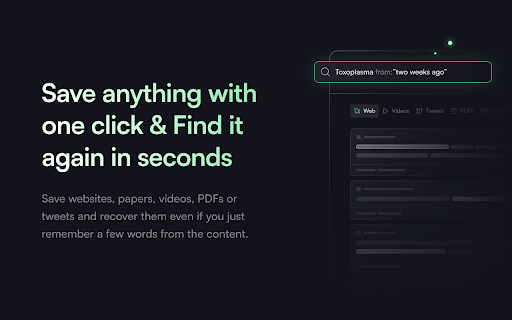
🔍 Full-text search pages and PDFs you annotated or bookmarked.
📝 Highlight and Annotate Websites & PDFs
🗄 Flexible organisation: Organise into Spaces + tab manager
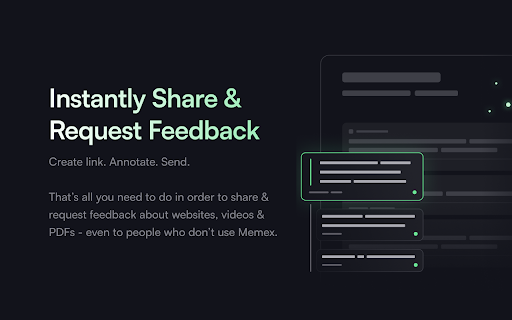
🌎 Share, collaborate on and discuss Spaces of pages and notes with others.
🔗 Link to highlights and annotations
🔄 Sync to Obsidian, Readwise, Logseq
📱 Across devices: Save, View & organise your knowledge on all of your devices, phones and tablets.
⚡️ Quick onboarding.Import from every major bookmarking service with your folder structure.
😎 Offline-first. All data is stored on your device.
⛅ Backup your data to any of your favourite cloud providers via file system sync

View our privacy policy: https://links.memex.garden/privacy


HOW TO USE
=============
🔍 Search: Type in 'm' followed by pressing the 'space' bar or tab in the address bar.
📝 Annotate: Highlight any piece of text and right click
🗄Organise: Move with the mouse to the right side of the screen, or click on the little 'brain' icon in the extension bar


FEEDBACK and TROUBLESHOOTING
============================

To leave bug reports and feature requests: community.memex.social
Support email: [email protected]
Chat with the team: memex.garden > the chat bubble in the bottom right corner

If Memex causes issues, there is this trick as old as computer service people are around:
Have you tried restarting the extension? 🤓
You can do so via chrome://extensions.

If a problem persists, keep the extension deactivated and drop by in our help section (above).
When deactivated then does not need RAM or CPU.
Deprecated, use Memex V2 instead: https://chromewebstore.google.com/detail/memex/jafcdndekgfbdajgmkiogbjackacckdp

Deep Reading for the web. As individuals, teams and communities.

Curate, annotate and discuss the most important websites, PDFs and YouTube videos.

FEATURES:
=========
🤖 Summarize & chat with websites, PDFs, YouTube videos
🔍 Full-text search pages and PDFs you annotated or bookmarked.
📝 Highlight and Annotate Websites & PDFs
🗄 Flexible organisation: Organise into Spaces + tab manager
🌎 Share, collaborate on and discuss Spaces of pages and notes with others.
🔗 Link to highlights and annotations
🔄 Sync to Obsidian, Readwise, Logseq
📱 Across devices: Save, View & organise your knowledge on all of your devices, phones and tablets.
⚡️ Quick onboarding.Import from every major bookmarking service with your folder structure.
😎 Offline-first. All data is stored on your device.
⛅ Backup your data to any of your favourite cloud providers via file system sync

View our privacy policy: https://links.memex.garden/privacy


HOW TO USE
=============
🔍 Search: Type in 'm' followed by pressing the 'space' bar or tab in the address bar.
📝 Annotate: Highlight any piece of text and right click
🗄Organise: Move with the mouse to the right side of the screen, or click on the little 'brain' icon in the extension bar


FEEDBACK and TROUBLESHOOTING
============================

To leave bug reports and feature requests: community.memex.social
Support email: [email protected]
Chat with the team: memex.garden > the chat bubble in the bottom right corner

If Memex causes issues, there is this trick as old as computer service people are around:
Have you tried restarting the extension? 🤓
You can do so via chrome://extensions.

If a problem persists, keep the extension deactivated and drop by in our help section (above).
When deactivated then does not need RAM or CPU.
Permissions & access
- Permissions
- alarmsbookmarkscontextMenustabsscriptingwebNavigationnotificationsunlimitedStoragestorageclipboardWrite
- Host access
- <all_urls>
Screenshots



About
Deprecated, use Memex V2 instead: https://chromewebstore.google.com/detail/memex/jafcdndekgfbdajgmkiogbjackacckdp

Deep Reading for the web. As individuals, teams and communities.

Curate, annotate and discuss the most important websites, PDFs and YouTube videos.

FEATURES:
=========
🤖 Summarize & chat with websites, PDFs, YouTube videos
🔍 Full-text search pages and PDFs you annotated or bookmarked.
📝 Highlight and Annotate Websites & PDFs
🗄 Flexible organisation: Organise into Spaces + tab manager
🌎 Share, collaborate on and discuss Spaces of pages and notes with others.
🔗 Link to highlights and annotations
🔄 Sync to Obsidian, Readwise, Logseq
📱 Across devices: Save, View & organise your knowledge on all of your devices, phones and tablets.
⚡️ Quick onboarding.Import from every major bookmarking service with your folder structure.
😎 Offline-first. All data is stored on your device.
⛅ Backup your data to any of your favourite cloud providers via file system sync

View our privacy policy: https://links.memex.garden/privacy


HOW TO USE
=============
🔍 Search: Type in 'm' followed by pressing the 'space' bar or tab in the address bar.
📝 Annotate: Highlight any piece of text and right click
🗄Organise: Move with the mouse to the right side of the screen, or click on the little 'brain' icon in the extension bar


FEEDBACK and TROUBLESHOOTING
============================

To leave bug reports and feature requests: community.memex.social
Support email: [email protected]
Chat with the team: memex.garden > the chat bubble in the bottom right corner

If Memex causes issues, there is this trick as old as computer service people are around:
Have you tried restarting the extension? 🤓
You can do so via chrome://extensions.

If a problem persists, keep the extension deactivated and drop by in our help section (above).
When deactivated then does not need RAM or CPU.
Technical
- Version
- 3.20.14
- Manifest
- V3
- Size
- 8.28MiB
- Min Chrome
- 88
- Languages
- 1
- Featured
- No
Metadata
- ID
- abkfbakhjpmblaafnpgjppbmioombali
- Developer ID
- u4add9e61557ba7ef6104b0c9bcfc0efb
- Developer Email
- [email protected]
- Created
- Oct 20, 2016
- Last Updated (Store)
- Apr 20, 2026
- Last Scraped
- Jun 23, 2026
- Website
- memex.garden
- Support URL
- https://help.memex.garden
- Privacy Policy
- https://memex.garden/privacy
Similar extensions
Alternatives to Memex, ranked by description similarity.

Souli - PDF & Web Highlighter with Notes
Free Productivity Web Highlighter & PDF Annotation Tool. Note-taking, Web Clipper + AI Summary & Chat. No sign-up, instant use.
353
★ 5.0

Reader Mode + AI Summary, Notes & Annotations
Distraction free reading mode with notes, annotations, and AI summaries - free, easy to use, no sign-up required.
1.0K
★ 4.3

Web Highlights: PDF & Web Highlighter + Notes & AI Summary
Productivity Highlighter & Annotation Tool for Websites & PDFs with AI Summary - free, easy to use, no sign-up required.
200.0K
★ 4.8

Kontxt – Social AI Memory Layer for the Web
Highlight, tag, and chat with AI on any site. Build shared memory, collaborate, and connect your content to every AI agent.
76
★ 5.0

Annotate web pages/CONTEXT
Use this extension to annotate (edit, highlight, popup/embedded notes & page notes) your web-pages.
1.0K
★ 3.5

Obsidian Web Clipper
Save and highlight web pages in a private and durable format that you can access offline. The official extension for Obsidian.
800.0K
★ 4.8

Roam Highlighter
Web highlighter for Roam Research
8.0K
★ 4.6

MindMemo
The web extension that helps you remember the content you save for later, later.
—
Data sourced from the Chrome Web Store · last verified Jun 23, 2026.