
Task Tap
Quickly create Google Tasks and Calendar events from a popup.
As of July 2026, Task Tap has — users in the Workflow & Planning category.
Usersno change0%
—
—
Ratingno change0%
—
— reviews
Reviewsno change0%
—
Version
1.0.3
Manifest V3
History
1 snapshotsTracking since Jul 1, 2026.
Not enough history yet for this metric — the chart fills in as we collect more snapshots.
View as table
| Date | Users | Rating | Reviews | Version |
|---|---|---|---|---|
| Jul 1, 2026 | — | — | — | 1.0.3 |
| Now | — | — | — | 1.0.3 |
Permissions & access
- Permissions
- storageidentity
- Host access
- None declared
Screenshots
About
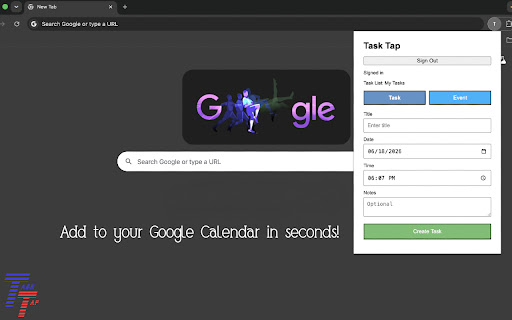
Task Tap helps you quickly add items to Google Tasks and Google Calendar without opening the full Google Calendar website.

Features:
• Create Google Tasks in seconds
• Add due dates and notes to tasks
• Create Google Calendar events
• Set event times, durations, locations, and descriptions
• Secure Google Sign-In integration
• Remembers your preferred Task or Event mode
• Lightweight and easy to use

Task Tap is designed for students, professionals, and anyone who wants a faster way to capture tasks and events while browsing the web.

How it works:

1. Sign in with your Google account
2. Choose Task or Event mode
3. Enter your details
4. Click Create

Your tasks and events are created directly in your Google account using Google's official APIs.

Privacy:
Task Tap does not collect, store, sell, or share personal information. All task and calendar operations occur directly between your browser and Google's services.
Technical
- Version
- 1.0.3
- Manifest
- V3
- Size
- 16.13KiB
- Min Chrome
- 88
- Languages
- 1
- Featured
- No
Metadata
- ID
- abkafjokjdepgeohkmboamcglonfljpn
- Developer ID
- uc061e34c942ad51b84e1049677119114
- Developer Email
- [email protected]
- Created
- Jun 30, 2026
- Last Updated (Store)
- Jun 30, 2026
- Last Scraped
- Jul 1, 2026
- Website
- —
- Support URL
- —
- Privacy Policy
- https://sites.google.com/view/tasktap-privacy/home
Data sourced from the Chrome Web Store · last verified Jul 1, 2026.