Blanks Maker
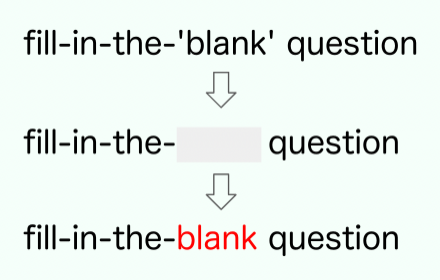
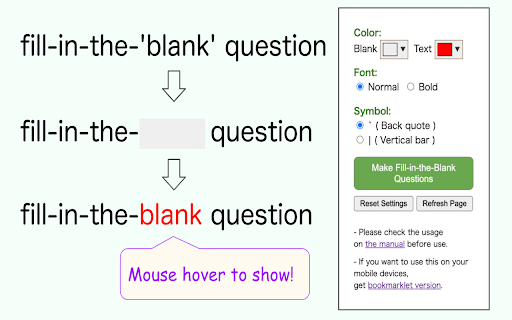
Make fill-in-the-blank questions by masking the strings enclosed in specific symbols.
As of June 2026, Blanks Maker has 9 users in the Workflow & Planning category.
Usersdown 10.0 percent−10.0%
9
9
Ratingno change0%
—
— reviews
Reviewsno change0%
—
Version
1.0.0
Manifest V3
History
1 snapshotsTracking since Apr 1, 2026.
View as table
| Date | Users | Rating | Reviews | Version |
|---|---|---|---|---|
| Apr 1, 2026 | 10 | — | — | 1.0.0 |
| Now | 9 | — | — | 1.0.0 |
Permissions & access
- Permissions
- activeTabscriptingstorage
- Host access
- None declared
Screenshots
About
FEATURES:
- Make fill-in-the-blank questions by masking characters enclosed in backquotes( ` ) or vertical bars( | ) in HTML documents.
- You can effectively do rote learning by using this on Notion or other services.
- If you want to use it on a mobile device, get the bookmarklet version from our website.

NOTE:
- Some sites do not allow you to change the display. (ex. Evernote)
- Do not mix styles such as text color in places you want to be blank.
- If it does not work, try reloading the page.

特徴:
・HTMLドキュメントのバッククォート( ` )や縦線( | )記号で囲まれた文字をマスクすることで、穴埋め問題を作ります。
・Notionなどのサービスでこの機能を有効にすることで、効率的に暗記学習ができます。
・モバイル端末で使いたい場合はウェブサイトからブックマークレット版を入手してください。

注意事項:
・サイトによっては表示を変えられない場合があります。(例: Evernote)
・空欄にしたい箇所で文字の色などスタイルを混在させないでください。
・うまく行かなかった場合は、ページのリロードを試してください。
Technical
- Version
- 1.0.0
- Manifest
- V3
- Size
- 59.18KiB
- Min Chrome
- 88
- Languages
- 1
- Featured
- No
Metadata
- ID
- abjijddjaoibcnjigfceiaapdgageedh
- Developer ID
- uc5b2aacd83c4fd96d6660960d408352b
- Developer Email
- [email protected]
- Created
- Apr 5, 2022
- Last Updated (Store)
- Apr 6, 2022
- Last Scraped
- Jun 1, 2026
- Website
- —
- Support URL
- —
- Privacy Policy
- —
Similar extensions
Alternatives to Blanks Maker, ranked by description similarity.
Simple URL Copy [F]
A tool that helps you to copy url.
4.0K
★ 4.6

Pure Copy - 書式なし & Markdownコピー
Webの文章を装飾なしのプレーンテキスト、またはNotion用のMarkdown形式でワンクリックコピー。ライター・ブロガーのための神ツール。
—

Clip Title and URL
A tool to copy the web page title and URL to the clipboard.
6

Click Inputer
事前に登録した値を、ワンクリックで入力枠に入力できます
—
★ 4.0

TitleUrlCopy
When you press command+c(mac) or ctrl+c(win) with no character selected, save the page title and URL on the clipboard.
2.0K
★ 4.8

Side Panel Notes
計算・色分け・画像保存機能付きの高機能メモ帳
49

SlackUtils
Tools to help you use Slack
100

ClipMate with XPath
XPath の設定をもとにウェブ上の情報をクリップボードにコピーするアプリです。
30
Data sourced from the Chrome Web Store · last verified Jun 1, 2026.