AITable Url to Image Converter
An extension designed to extract images from URLs and upload them to AITable.
As of June 2026, AITable Url to Image Converter has 135 users and a 5.00/5 rating from 1 reviews in the Productivity category.
Usersdown 4.9 percent−4.9%
135
135
Ratingno change0%
5.00
1 reviews
Reviewsno change0%
1
Version
0.1.3
Manifest V3
History
3 snapshotsTracking since Apr 1, 2026.
View as table
| Date | Users | Rating | Reviews | Version |
|---|---|---|---|---|
| Apr 1, 2026 | 142 | 5.00 | 1 | 0.1.3 |
| May 2, 2026 | 135 | 5.00 | 1 | 0.1.3 |
| Jun 1, 2026 | 137 | 5.00 | 1 | 0.1.3 |
| Now | 135 | 5.00 | 1 | 0.1.3 |
Permissions & access
- Permissions
- storage
- Host access
- https://aitable.ai/*, https://apitable.com/*, https://vika.cn/*
Screenshots
About
This is a browser extension that extracts images from URLs and uploads them to AITable or APITable.

● Features
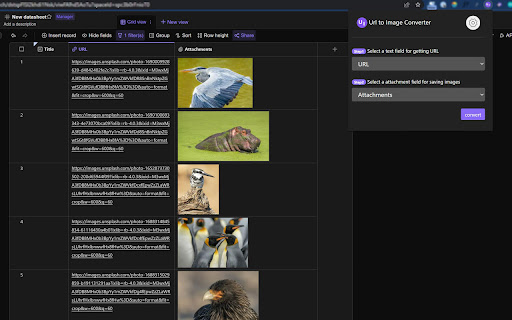
✨ You can extract images from URL addresses and save them to the "Attachment" field.
✨ Supports processing multiple URLs separated by commas (in a single cell), enabling multiple attachments to be saved in the same cell.

● Configuration
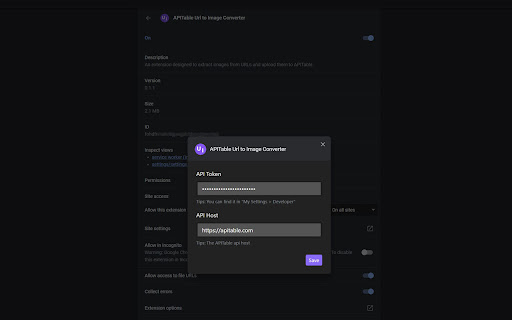
Before using the extension, follow these steps to set your API access credentials and host information:

1. Open the extension's options page.
If you can't find the options page, right-click the extension icon and click button "Options".

2. In the options page, enter your AITable API Token and API Host information.
If you don't have an API Token yet, you can register and obtain one on the https://aitable.ai/

3. Save the settings and return to the extension's pop-up page.

● Usage
1. Visit https://aitable.ai/ and open the datasheet to be processed.

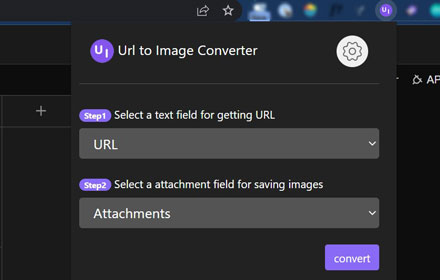
2. Click the icon of this extension to bring up the operation interface. Select which field to read the URL information from and specify which attachment field to save the image data collected from the URL.

    > Tip 1: URLs must be stored in fields of the following three types: "Single Line Text", "Long Text", and "URL". Other field types will be filtered out and will not appear in the drop-down selection box.

    > Tip 2: You must first open the aitable.ai datasheet link and then start the browser extension. Otherwise, the extension will be unable to get the field list of the datasheet.

3. After confirming that everything is correct, click the "convert" button, and the extension will begin extracting images and saving to "attachments" field in the background (extension service worker).

    > Tip: Since this is done in the background, you can close the extension popup window and even the currently active AITable webpage after starting the process. The image extraction and attachment conversion will continue to function normally (but you cannot close the browser...).

● FAQ
Q: Can other file formats be extracted and saved to AITable?
A: Yes. As long as the URL points to a file that can be directly downloaded by the browser, whether it's a PDF or an mp4, it can be converted using this extension.

Q: Some URLs fail to be converted successfully. How can I check the logs or debug?
A: Right-click on the extension pop-up window and select "Inspect" from the menu to view the log messages through the console. Or open the console of the service worker to view the background running logs.

Q: What's the relationship between AITable and APITable?
A: APITable is the community edition of AITable. Extension "Url to Image Converter" works for both of them.
Technical
- Version
- 0.1.3
- Manifest
- V3
- Size
- 786KiB
- Min Chrome
- 88
- Languages
- 1
- Featured
- No
Metadata
- ID
- abhmjpijkninkcgcpamephapolablekn
- Developer ID
- uceaad12024fb5e54bec41186c566620e
- Developer Email
- [email protected]
- Created
- Aug 3, 2023
- Last Updated (Store)
- Apr 16, 2024
- Last Scraped
- Jun 1, 2026
- Website
- —
- Privacy Policy
- —
Similar extensions
Alternatives to AITable Url to Image Converter, ranked by description similarity.

Image Downloader
Find and download all the images on the page or download the image data in json format
565

Web Scraper
Use Web Scraper for web scrapping, instant data scraper and table capture to quickly extract structured data from any website pages
899
★ 5.0

Table to Excel
Convert HTML tables to Excel files with hover effect
1.0K
★ 5.0

Extract Table from PDF
Tool to extract table from PDF – copy, export or extract table data from pdf to excel or csv.
361
★ 4.0

Ge Zhi Ball
Extension that gets HTML text and '*caption-en.vtt*' files from requests, then send to localhost:3333/upload when icon is clicked
3
★ 5.0

Airbnb Image Downloader
Download high-quality images in batches from Airbnb listings
55
★ 5.0

AVIF to WebP
Convert AVIF images to WebP format with adjustable quality and transparency preservation
27
Image Text Extractor
Try Image Text Extractor – it immediately isolates text from a picture, offering brisk conversion while ensuring flawless results.
24
Data sourced from the Chrome Web Store · last verified Jun 1, 2026.