
Markup AI
Markup AI keeps your content clear, on-brand, and compliant — right inside Google Docs.
As of June 2026, Markup AI has 51 users and a 5.00/5 rating from 2 reviews in the Productivity category.
Usersno change0%
51
51
Ratingno change0%
5.00
2 reviews
Reviewsno change0%
2
Version
1.20.0
Manifest V3
History
1 snapshotsTracking since Jun 24, 2026.
View as table
| Date | Users | Rating | Reviews | Version |
|---|---|---|---|---|
| Jun 24, 2026 | 51 | 5.00 | 2 | 1.20.0 |
| Now | 51 | 5.00 | 2 | 1.20.0 |
Permissions & access
- Permissions
- storagescriptingtabssidePanel
- Host access
- https://us.posthog.com/*, *://*.markup.ai/*, *://docs.google.com/*
Screenshots




About
Writers shouldn't have to memorize dozens, sometimes hundreds, of brand guidelines. Configure your brand standards once in the Markup AI console, and the extension's agents apply them automatically every time you write. All it takes is to upload your brand guide and a few links to content you love, and Markup AI will tailor every suggestion to your voice, tone, and brand terms.

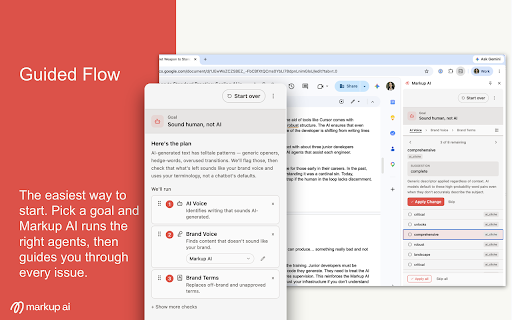
Open the side panel, run a check, and Markup AI gives you instant, actionable feedback — catching what's off-brand, off-target, or using the wrong terms, with a one-click fix for each issue. Apply the rewrite, add it as a tracked suggestion, or leave a comment for someone to review, all without leaving your document.

The extension runs the full set of Markup AI agents. The core ones:

* Brand Voice — Finds content that doesn't sound like your brand.

* Brand Terms — Replaces off-brand and unapproved terms with preferred alternatives.

* Persona — Catches content that doesn't resonate with your intended audience.

* Sentence Clarity — Flags long, tangled, or hard-to-follow sentences and suggests clearer versions.

* AI Voice — Flags writing that reads as AI-generated and helps your drafts sound like you wrote them.

Beyond the core agents, Labs gives you early access to newer capabilities we’re still refining. They help your content get found, stay credible, and perform in AI search. Labs agents are on by default so you can explore the latest agents as they ship; an admin can turn it off for your organization.

See the full agent catalog at docs.markup.ai/agents.

Get up and running in under two minutes:

1. Install and pin the Markup AI extension to your Chrome toolbar.
2. Sign up for free at console.markup.ai — no credit card required. Your 30-day free trial starts immediately.
3. Open a Google Doc, select the Markup AI icon to open the side panel, and run a check to get instant, actionable feedback.

Markup AI works in Google Docs. Support for more surfaces is on the way. Full documentation is at docs.markup.ai.
Technical
- Version
- 1.20.0
- Manifest
- V3
- Size
- 1.99MiB
- Min Chrome
- 88
- Languages
- 1
- Featured
- No
Metadata
- ID
- abfamcopbgmiehgnnjchnkaikmejpgag
- Developer ID
- ue7374c5840b06126189287dd61cd1caa
- Developer Email
- [email protected]
- Created
- Feb 7, 2026
- Last Updated (Store)
- Jun 23, 2026
- Last Scraped
- Jun 24, 2026
- Website
- —
- Support URL
- —
- Privacy Policy
- https://markup.ai/privacy-policy/
Data sourced from the Chrome Web Store · last verified Jun 24, 2026.