Removed from the Chrome Web Store — detected missing on Jun 2, 2026. The data below is the last known snapshot.

Open AI Chat GPT For Email - Chatgpt Email - GMPlus
Display ChatGPT response as a suggestion to complete emails, Powered By OpenAI
As of June 2026, Open AI Chat GPT For Email - Chatgpt Email - GMPlus has 30,000 users and a 4.16/5 rating from 83 reviews in the Productivity category.
Usersdown 25.0 percent−25.0%
30.0K
30,000
Ratingno change0%
4.16
83 reviews
Reviewsno change0%
83
Version
2.0.21
Manifest V3
90-day change · In the last 90 days this extension lost 10.0K users.
History
2 snapshotsTracking since May 2, 2026.
View as table
| Date | Users | Rating | Reviews | Version |
|---|---|---|---|---|
| May 2, 2026 | 40.0K | 4.16 | 83 | 2.0.21 |
| Jun 1, 2026 | 40.0K | 4.16 | 83 | 2.0.21 |
| Now | 30.0K | 4.16 | 83 | 2.0.21 |
Permissions & access
- Permissions
- storage
- Host access
- https://*.openai.com/, https://mail.google.com/*
Screenshots




About
"Introducing GMPlus - Your AI Powered Email Assistant for Gmail. Harnessing the power of OpenAI's ChatGPT, we bring you a free, privacy-oriented Chrome extension that significantly enhances your Gmail experience.

GMPlus is packed with intuitive features designed to optimize your email writing process:
1. **AI-Powered Responses:**
GMPlus delivers superior quality responses that outshine all other tools in the market. It's your personal grammar guru, fixing any typos and suggesting more effective phrasing.
2. **Context-Smart Compositions:**
GMPlus excels at composing emails and messages from given contexts or subjects, enabling you to craft impressive emails from scratch.
3. **Email Completion:**
Ever stuck on how to conclude your email? GMPlus has your back. With the press of a button, it provides a completion suggestion based on your email's context.
"4. AI-Generated Prompts:
To expedite your email creation process, GMPlus offers AI-generated prompts tailored to various professions. Whether you're in sales, marketing, HR, or any other field, you'll discover a prompt designed to cater to your specific needs."
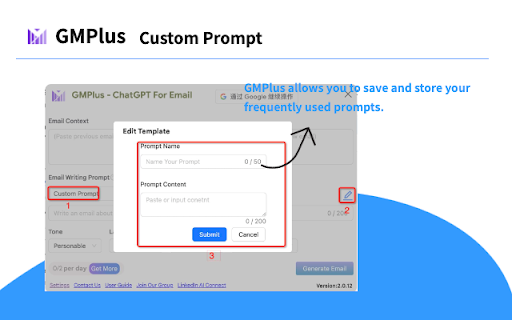
5. **Custom Template Storage:**
GMPlus allows you to save and store your frequently used prompts. This feature enables you to quickly access and reuse your favorite prompt templates, enhancing your efficiency.
6. **Multilingual Support:**
GMPlus supports all languages, providing assistance no matter what language you're writing in.
7. **Toggle On or Off:**
Adapt GMPlus to your workflow. Use it when needed, and turn it off when you don't.

"Here's how you can leverage GMPlus to its fullest potential on Gmail:
1. **Start Writing:** Open Gmail and begin drafting a new email.
2. **Seek Assistance:** Whenever you find yourself needing help, take a glance just below your input box. There, you'll find the GMPlus icon.
3. **Choose Your Prompt:** Select a prompt that resonates with your intended message. Feel free to modify its subject or keywords to better suit your needs.
4. **Generate Your Email:** Upon selecting a prompt, ChatGPT will spring into action, crafting your email meticulously.
5. **Approve the Draft:** Review the AI-generated draft. If it meets your expectations, simply click on it to make it your email draft.

Note: You can opt to either sign in or stay signed out of OpenAI's ChatGPT. We provide the necessary API to use it either way."

Who Can Benefit From GMPlus?
Whether you're a marketing professional crafting persuasive pitches, an HR representative communicating with multiple candidates, or a salesperson constantly reaching out to leads, GMPlus is your perfect ally. It significantly reduces the time spent on composing emails and ensures that your messages are clear, concise, and professional.

At GMPlus, your privacy is our priority. We don't use ads, cookies, or third-party trackers. When composing or replying to an email, only the user prompt and the preceding email's text content (which can be edited to remove sensitive information) are sent to the AI model.

Experience the future of email with GMPlus, your AI-powered assistant for Gmail."


~~~~~~~~~~~~~~~~~~~~~~~~~~~~~~~~~~~~~~~~~~~~~~~~~~~~~~~~~~

This is a chrome extension tool based on chatgpt to assist in writing email content.

A Free browser extension for Gmail that completes emails for you using ChatGPT. Privacy-friendly Chrome extension to generate entire emails and messages using ChatGPT AI.

~~~~~~~~~~~~~~~~~~~~~~~~~~~~~~~~~~~~~~~~~~~~~~~~~~~~~~~~~~
Here are the advantages of this tool:
✔️ Highest quality responses that outcompete all other tools in the market.
✔️ Works better on Gmail
✔️ All languages are supported
✔️ Completes emails for you by a given context
✔️ Completes the subject of the email
✔️ Fixes any typos you might have
✔️ Accessible button to let ChatGPT complete the email
✔️ Can be turned on or off at any time

~~~~~~~~~~~~~~~~~~~~~~~~~~~~~~~~~~~~~~~~~~~~~~~~~~~
HOW TO USE ON GMAIL
1. Open Gmail
2. Create new email and start writing it
3. In the left side of your input text, ChatGPT for Gmail icon will appear
4. Click it and a suggestion of Chat GPT to complete your email will show on screen
5. If you chose to accept it, just click on it

~~~~~~~~~~~~~~~~~~~~~~~~~~~~~~~~~~~~~~~~~~~~~~~~~~~
FAQ
Which data is shared with the AI model?
When writing a new email, the data sent is the user prompt. When replying to an email, the data sent is the previous email text content (which can be edited to remove sensitive information) and the user prompt.

~~~~~~~~~~~~~~~~~~~~~~~~~~~~~~~~~~~~~~~~~~~~~~~~~~~
What is your privacy policy?
This tool respects your privacy and does not use ads, cookies, or third-party trackers.
Technical
- Version
- 2.0.21
- Manifest
- V3
- Size
- 1.29MiB
- Min Chrome
- 88
- Languages
- 51
- Featured
- Yes
Metadata
- ID
- abekedpmkgndeflcidpkkddapnjnocjp
- Developer ID
- u9fee793c6fd688b34f16b4cb4a053d57
- Developer Email
- [email protected]
- Created
- Feb 17, 2023
- Last Updated (Store)
- Jan 25, 2025
- Last Scraped
- Jun 1, 2026
- Website
- https://gmplus.io/
- Support URL
- —
- Privacy Policy
- https://gmplus.io/gmplus-private-policy
Data sourced from the Chrome Web Store · last verified Jun 1, 2026.