
Simple mass downloader
A lightweight batch download manager with flexible filtering and mass-renaming options for easier, more efficient downloads.
As of June 2026, Simple mass downloader has 100,000 users and a 4.57/5 rating from 404 reviews in the Workflow & Planning category.
Usersup 25.0 percent+25.0%
100.0K
100,000
Ratingno change0%
4.57
404 reviews
Reviewsup 0.7 percent+0.7%
404
Version
0.865
Manifest V3
90-day change · In the last 90 days this extension gained 20.0K users, 6 version updates.
History
7 snapshotsTracking since May 30, 2026.
View as table
| Date | Users | Rating | Reviews | Version |
|---|---|---|---|---|
| May 30, 2026 | 80.0K | 4.57 | 401 | 0.850 |
| Jun 2, 2026 | 80.0K | 4.57 | 401 | 0.850 |
| Jun 4, 2026 | 90.0K | 4.57 | 402 | 0.853 |
| Jun 7, 2026 | 90.0K | 4.57 | 402 | 0.855 |
| Jun 10, 2026 | 90.0K | 4.57 | 402 | 0.857 |
| Jun 13, 2026 | 100.0K | 4.57 | 404 | 0.861 |
| Jun 18, 2026 | 100.0K | 4.57 | 404 | 0.862 |
| Now | 100.0K | 4.57 | 404 | 0.865 |
Changelog
- Jun 13, 2026description
Simple Mass Downloader is a lightweight and unobtrusive Chrome download manager and batch/bulk/mass downloader.

GOOD FOR:

Downloading multiple resources from the web:
● Extract only the desired links from web pages using an advanced filtering system.
● Generate better file names using contextual information from the corresponding links (name masks).
● Organize downloads into custom directories using Favorite Folders or Automatic Folders.

NOT SO GOOD FOR:

● Downloading streaming media or embedded videos.
● JavaScript-heavy websites where download links are generated on the fly after user interaction. In such cases, the extension cannot detect the links in advance.

MAIN FEATURES:

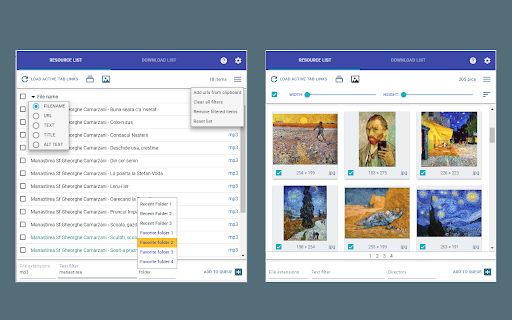
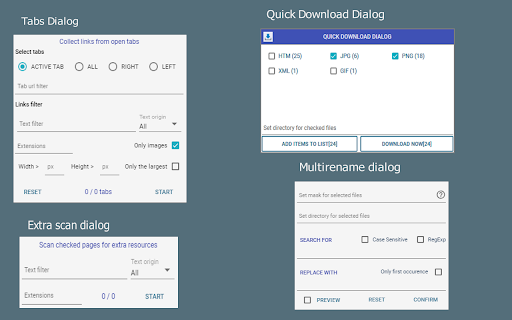
● Extract links from the active tab, multiple open tabs, or selected text on web pages. You can also import links from the clipboard, a local file, or a pattern URL.

● Advanced filtering and mass-renaming capabilities using various name masks. You can also define custom categories for resource filtering.

● A dedicated thumbnail grid view for images. Images can be sorted by size or filtered by width and height.

● A flexible routing system: downloads can be automatically directed to custom folders based on user-defined rules.

● User-defined Favorite Folders, easily accessible when a custom download directory is needed.

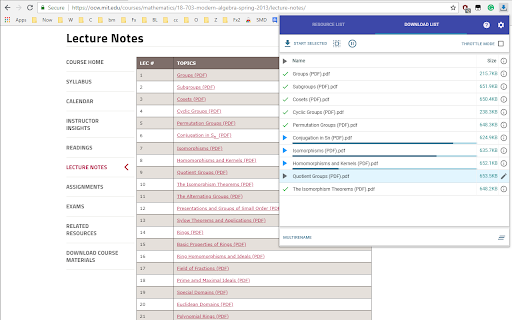
● Flexible download management:
  a) Pause, resume, and open downloaded files.
  b) Set server limits or enable sequential downloading mode.

● Export URL lists using configurable name masks.

PLEASE NOTE:

● Development and testing are mainly performed on Windows, with limited testing on Linux. The extension has not been tested on macOS.

● Before using the extension, verify that the “Ask where to save each file before downloading” option is disabled in Chrome’s download settings. Otherwise, multiple “Save As” dialog boxes will appear, defeating the purpose of a mass-downloading extension.
Collect, filter, rename, and download many files without opening each link by hand.

It works with links from the current page, selected text, open tabs, the clipboard, local files, and generated URL patterns.

Main features:
● Extract links and images from web pages, selections, tabs, clipboard, local files, or URL patterns.
● Filter resources by URL, text, file type, category, image size, width, or height.
● Rename files in bulk using flexible name masks.
● Organize downloads with Favorite Folders and Automatic Folders.
● Manage downloads with pause, resume, retry, cancel, server limits, and sequential mode.
● Export selected links for use in external download managers.

Limitations:
● It cannot download streaming media or embedded videos.
● It may not detect links generated dynamically by JavaScript after user interaction.

Important:
Before using batch downloads, disable “Ask where to save each file before downloading” in Chrome’s download settings. Otherwise Chrome will show a separate “Save As” dialog for each file.
- Jun 2, 2026description
This is a light and unobtrusive chrome download manager and batch/bulk/mass downloader.

 Good for:
 Assist the user in batch downloading various resources from the web:
 ● extract from the bulk links of web pages only desired ones (advanced filtering system)
 ● give better names for downloading files using the contextual info available for the corresponding links (name masks system)
 ● organise downloads by directing them to appropriate custom folders (favorite or automatic folders)

NOT so good for:
● downloading streaming media or embedded videos
● heavily javascripted sites where download links are generated "on the fly" (on user clicks) so my extension cannot see them in advance for objective reasons)

 MAIN FEATURES:

●  The links may be extracted from active tab / multiple open tabs or from selected text on web pages. Also from the clipboard or a local file or a pattern URL.

●  Advanced filtering/mass renaming capabilities using various name masks. Also with user-defined categories for resource filtering.

●  For images, there is a special thumbnails grid view where items may be ordered by the size or filtered by width/height.

●  Flexible routing system: the user can set Automatic Folders where downloads are automatically directed based on custom rules.

●  User-defined Favorite Folders, easily accessible when the user needs a custom download directory.

●  Flexible download management, the user can:
	a) pause, resume, open downloaded files, etc. (usual features)
	b) set server limits or force sequential downloading mode.

●  The URL list can be exported using various name masks

Please, note that
●  Development is mainly done in Windows, with limited testing in Linux. No testing possibilities on MacOS, sorry.
●  Before using, please verify that "Ask where to save each file before downloading" option in Chrome Download Settings is NOT checked. Otherwise, a lot of "Save As" dialog boxes will pop up, defeating the main purpose of this extension (or any other mass downloading chrome extension).
Simple Mass Downloader is a lightweight and unobtrusive Chrome download manager and batch/bulk/mass downloader.

GOOD FOR:

Downloading multiple resources from the web:
● Extract only the desired links from web pages using an advanced filtering system.
● Generate better file names using contextual information from the corresponding links (name masks).
● Organize downloads into custom directories using Favorite Folders or Automatic Folders.

NOT SO GOOD FOR:

● Downloading streaming media or embedded videos.
● JavaScript-heavy websites where download links are generated on the fly after user interaction. In such cases, the extension cannot detect the links in advance.

MAIN FEATURES:

● Extract links from the active tab, multiple open tabs, or selected text on web pages. You can also import links from the clipboard, a local file, or a pattern URL.

● Advanced filtering and mass-renaming capabilities using various name masks. You can also define custom categories for resource filtering.

● A dedicated thumbnail grid view for images. Images can be sorted by size or filtered by width and height.

● A flexible routing system: downloads can be automatically directed to custom folders based on user-defined rules.

● User-defined Favorite Folders, easily accessible when a custom download directory is needed.

● Flexible download management:
  a) Pause, resume, and open downloaded files.
  b) Set server limits or enable sequential downloading mode.

● Export URL lists using configurable name masks.

PLEASE NOTE:

● Development and testing are mainly performed on Windows, with limited testing on Linux. The extension has not been tested on macOS.

● Before using the extension, verify that the “Ask where to save each file before downloading” option is disabled in Chrome’s download settings. Otherwise, multiple “Save As” dialog boxes will appear, defeating the purpose of a mass-downloading extension.
- Jun 2, 2026short_description
A light batch download manager with flexible filtering/mass-renaming options that make downloading files a lot easier & productive.
A lightweight batch download manager with flexible filtering and mass-renaming options for easier, more efficient downloads.
Permissions & access
- Permissions
- storageunlimitedStoragetabsactiveTabdownloadsdownloads.opencontextMenusclipboardReadwebNavigationscriptingoffscreen
- Host access
- <all_urls>
Screenshots

About
Collect, filter, rename, and download many files without opening each link by hand.

It works with links from the current page, selected text, open tabs, the clipboard, local files, and generated URL patterns.

Main features:
● Extract links and images from web pages, selections, tabs, clipboard, local files, or URL patterns.
● Filter resources by URL, text, file type, category, image size, width, or height.
● Rename files in bulk using flexible name masks.
● Organize downloads with Favorite Folders and Automatic Folders.
● Manage downloads with pause, resume, retry, cancel, server limits, and sequential mode.
● Export selected links for use in external download managers.

Limitations:
● It cannot download streaming media or embedded videos.
● It may not detect links generated dynamically by JavaScript after user interaction.

Important:
Before using batch downloads, disable “Ask where to save each file before downloading” in Chrome’s download settings. Otherwise Chrome will show a separate “Save As” dialog for each file.
Technical
- Version
- 0.865
- Manifest
- V3
- Size
- 187KiB
- Min Chrome
- 88
- Languages
- 1
- Featured
- No
Metadata
- ID
- abdkkegmcbiomijcbdaodaflgehfffed
- Developer ID
- u11ec8fa3b2c175370236a6c586d5e059
- Developer Email
- [email protected]
- Created
- Jun 2, 2018
- Last Updated (Store)
- Jun 16, 2026
- Last Scraped
- Jun 18, 2026
- Website
- —
- Support URL
- https://goo.gl/forms/XPfyfRZUAtMx5taA3
- Privacy Policy
- —
Data sourced from the Chrome Web Store · last verified Jun 18, 2026.