
AUTO AI Search
컨설턴트를 위한 기업 탐색 AI 도구. 원하는 기업을 빠르고 정확하게 찾아주는 스마트 AI 검색 솔루션.
As of July 2026, AUTO AI Search has — users in the Workflow & Planning category.
Usersno change0%
—
—
Ratingno change0%
—
— reviews
Reviewsno change0%
—
Version
1.0
Manifest V3
History
1 snapshotsTracking since Jul 2, 2026.
Not enough history yet for this metric — the chart fills in as we collect more snapshots.
View as table
| Date | Users | Rating | Reviews | Version |
|---|---|---|---|---|
| Jul 2, 2026 | — | — | — | 1.0 |
| Now | — | — | — | 1.0 |
Permissions & access
- Permissions
- sidePanel
- Host access
- http://gfcai.samsunglife.com:3100/*, https://gfcai.samsunglife.com:3100/*
Screenshots

About
한국어
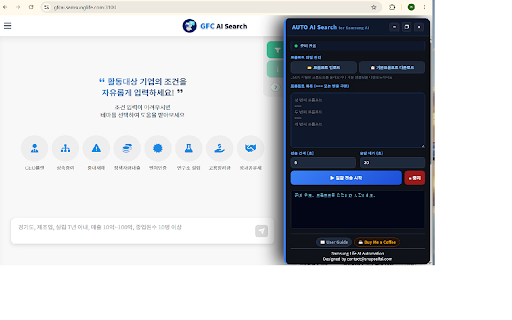
  Samsung Life AI 플랫폼에서 다수의 프롬프트를 자동으로 순차 전송하는 업무 자동화 도구입니다.

  English
  Automates sequential prompt sending on the Samsung Life AI platform for streamlined workflow
  efficiency.

  ---
  3. 상세 설명

  한국어
  🤖 AUTO AI Search — Samsung Life AI 자동화 도구

  Samsung Life AI 플랫폼(gfcai.samsunglife.com)에서 반복적인 프롬프트 입력 작업을 자동화하는
  Chrome 확장 프로그램입니다.

  ━━━━━━━━━━━━━━━━━━━━━━
  ✨ 주요 기능
  ━━━━━━━━━━━━━━━━━━━━━━

  📋 대량 프롬프트 자동 전송
  여러 개의 프롬프트를 순차적으로 자동 전송합니다.
  반복 작업 없이 한 번에 대량 처리가 가능합니다.

  📂 프롬프트 파일 관리
  JSON 또는 TXT 파일로 프롬프트를 업로드하여 관리합니다.
  TXT 파일은 === 구분자로 프롬프트를 구분합니다.

  ⚙️  전송 설정 조정
  전송 간격과 응답 대기 시간을 자유롭게 설정할 수 있습니다.

  📊 실시간 로그
  프롬프트 전송 진행 상황을 실시간으로 확인합니다.

  🖱️  드래그 가능한 플로팅 패널
  화면 어디서든 패널을 자유롭게 이동할 수 있습니다.

  ━━━━━━━━━━━━━━━━━━━━━━
  📖 사용 방법
  ━━━━━━━━━━━━━━━━━━━━━━
  1. Samsung Life AI 플랫폼(gfcai.samsunglife.com:3100) 접속
  2. 페이지 우측에 자동으로 패널 표시
  3. 프롬프트 입력 또는 파일 업로드
  4. 전송 간격 설정 후 일괄 전송 시작

  ━━━━━━━━━━━━━━━━━━━━━━
  📖 User Guide · 문의
  ━━━━━━━━━━━━━━━━━━━━━━
  User Guide: https://aiproductmanager.tistory.com/2075
  문의: [email protected]

  English
  🤖 AUTO AI Search — Samsung Life AI Automation Tool

  A Chrome extension that automates repetitive prompt input on the Samsung Life AI platform
  (gfcai.samsunglife.com).

  ━━━━━━━━━━━━━━━━━━━━━━
  ✨ Key Features
  ━━━━━━━━━━━━━━━━━━━━━━

  📋 Bulk Prompt Auto-Send
  Automatically sends multiple prompts sequentially.
  Process large batches in one go without manual repetition.

  📂 Prompt File Management
  Upload and manage prompts via JSON or TXT files.
  TXT files use === as a separator between prompts.

  ⚙️  Flexible Send Settings
  Customize send interval and response wait time freely.

  📊 Real-time Logs
  Monitor prompt sending progress in real time.

  🖱️  Draggable Floating Panel
  Move the panel anywhere on the screen as needed.

  ━━━━━━━━━━━━━━━━━━━━━━
  📖 How to Use
  ━━━━━━━━━━━━━━━━━━━━━━
  1. Visit Samsung Life AI platform (gfcai.samsunglife.com:3100)
  2. The panel appears automatically on the right side
  3. Enter prompts or upload a file
  4. Set send interval and start batch sending

  ━━━━━━━━━━━━━━━━━━━━━━
  📖 User Guide & Support
  ━━━━━━━━━━━━━━━━━━━━━━
  User Guide: https://aiproductmanager.tistory.com/2075
  Contact: [email protected]
Technical
- Version
- 1.0
- Manifest
- V3
- Size
- 52.75KiB
- Min Chrome
- 88
- Languages
- 1
- Featured
- No
Metadata
- ID
- aaodmajkocomfohldhanclajfdckgjmc
- Developer ID
- ucfb602b6c59c00b69738d1a69366480a
- Developer Email
- [email protected]
- Created
- Jul 1, 2026
- Last Updated (Store)
- Jul 1, 2026
- Last Scraped
- Jul 2, 2026
- Website
- —
- Support URL
- https://aiproductmanager.tistory.com/2075
Data sourced from the Chrome Web Store · last verified Jul 2, 2026.