
T3 Toolkit
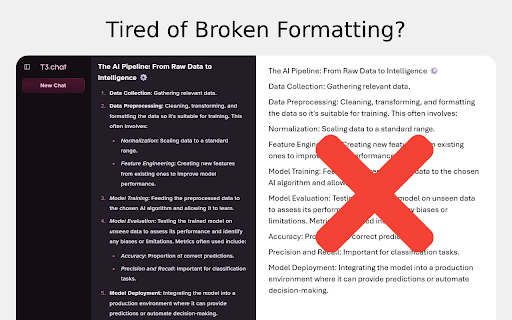
Stop reformatting text from t3.chat! Perfectly copy bold, italics, lists, and more with a single copy.
As of May 2026, T3 Toolkit has — users in the Productivity category.
Usersno change0%
—
—
Ratingno change0%
—
— reviews
Reviewsno change0%
—
Version
2025.6.17
Manifest V3
History
3 snapshotsTracking since Apr 1, 2026.
View as table
| Date | Users | Rating | Reviews | Version |
|---|---|---|---|---|
| Apr 1, 2026 | 3 | — | — | 2025.6.17 |
| Apr 21, 2026 | — | — | — | 2025.6.17 |
| May 6, 2026 | 2 | — | — | 2025.6.17 |
| Now | — | — | — | 2025.6.17 |
Permissions & access
- Permissions
- None declared
- Host access
- None declared
Screenshots

About
Have you ever copied a beautifully formatted answer from an AI chat—complete with headings, lists, and code snippets—only to paste it as a messy, unformatted wall of text? The time you saved using AI is instantly lost to tedious reformatting.

T3 Toolkit is the simple, powerful solution you've been looking for. It's a lightweight, "install and forget" extension that ensures when you copy text from t3.chat, you get exactly what you see.

Key Features
- Flawless Formatting Preservation: Say goodbye to plain text. T3 Toolkit intelligently captures and preserves all rich text formatting.
- Preserves Rich Text: Bold, italics, strikethrough, and tables are copied perfectly.
- Intelligent Lists: Bulleted and numbered lists, including nested lists, are maintained with their proper indentation and structure.
- Maintains Structure: Headings, blockquotes, and other structural elements are kept intact, saving you from having to rebuild your content.

How It Works
It couldn't be simpler. There are no settings to configure.
- Install the extension from the Chrome Web Store.
- Navigate to t3.chat
- Copy text as you normally would (Ctrl+C or Cmd+C).
- Paste it anywhere—Google Docs, Microsoft Word, Notion, etc.
- That's it! The formatting will be perfectly preserved.
- Privacy First

For support or feedback, please contact us at https://github.com/EastArctica/t3-toolkit/issues
Technical
- Version
- 2025.6.17
- Manifest
- V3
- Size
- 31.64KiB
- Min Chrome
- 88
- Languages
- 1
- Featured
- No
Metadata
- ID
- aaialjbhjnhbddfkfhfhcecdlfpeifan
- Developer ID
- ue9cee33309be849bf6f3f687d96489b7
- Developer Email
- [email protected]
- Created
- Jun 15, 2025
- Last Updated (Store)
- Jun 18, 2025
- Last Scraped
- May 31, 2026
- Website
- —
- Privacy Policy
- —
Similar extensions
Alternatives to T3 Toolkit, ranked by description similarity.

PlainTextify: AI Clean Text Converter
Convert AI-generated or formatted text to clean plain text. Removes styles, symbols, hidden characters, and AI fingerprints.
85

Copy without Formatting
Copy selected text without any formatting
118

AI Text Cleaner: Format & Copy
Clean AI responses from stars, dashes, and links instantly.
28

Copy With Format
Copy With Format For AI Assistants
556
★ 5.0

Plain text converter
Use this tool to paste without formatting — convert copied content and paste as plain text anywhere with one click.
95

Copy Selected Text
Adds a context menu option to copy selected text.
7

ThriveCart Formatting Preserver
Preserves bold, italic, and line breaks when pasting into ThriveCart editors. By Dom Jedro — justdigital.world
5

Copy Clean
Copy clean plain text from any page (remove junk formatting, fix line breaks, normalize quotes).
—
Data sourced from the Chrome Web Store · last verified May 31, 2026.