
ChatGPT JumpBack
Quickly jump back to your last reading position in ChatGPT.
As of May 2026, ChatGPT JumpBack has 3 users in the Productivity category.
Usersup 200.0 percent+200.0%
3
3
Ratingno change0%
—
— reviews
Reviewsno change0%
—
Version
1.1.0
Manifest V3
History
4 snapshotsTracking since Apr 1, 2026.
View as table
| Date | Users | Rating | Reviews | Version |
|---|---|---|---|---|
| Apr 1, 2026 | 1 | — | — | 1.1.0 |
| Apr 21, 2026 | 2 | — | — | 1.1.0 |
| May 6, 2026 | 2 | — | — | 1.1.0 |
| May 18, 2026 | 2 | — | — | 1.1.0 |
| Now | 3 | — | — | 1.1.0 |
Permissions & access
- Permissions
- contextMenustabsstoragescripting
- Host access
- https://chat.openai.com/*, https://chatgpt.com/*
Screenshots


About
# Release v1.1.0

## Overview

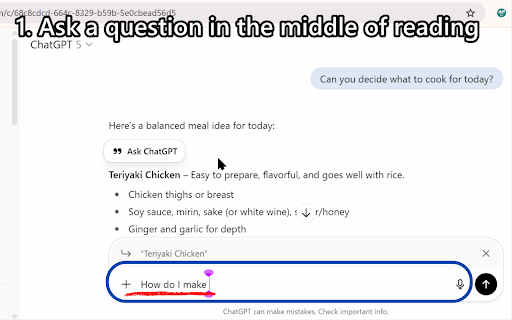
- This feature lets you return to your original place with a single click after sending a question to the AI or pressing the scroll button while using ChatGPT. When you’re reviewing past conversation logs and feel like asking a question, you no longer need to search for your place again. After viewing the AI’s response, if you come up with another question, no problem! With just a few clicks, you can always return to your original spot.

## Highlights

- One-click or keyboard shortcut return on ChatGPT pages

- Simple icon behavior (ON = color, OFF = gray)
- Multi-language UI (en/ja/zh-CN/es/pt-BR/ko/de/fr/hi)
- No analytics; ON/OFF settings are saved locally only

## Shortcuts

- Alt+J (Alt+Shift+J on Mac) — configurable at chrome://extensions/shortcuts

## Permissions

- contextMenus, tabs, storage, scripting (used only for injection into existing tabs)

## Changes

### v1.1.0

- Extended the feature to allow jumping back repeatedly to earlier positions on the page, not just the most recent one.

### v1.0.2

- Fixed/updated GIF demo in README.
- Info menu link now opens Chrome Web Store in JA/EN based on browser language.

### v1.0.1

- Added usage disclaimer to the README
  (clarifying that this is an unofficial tool, not affiliated with OpenAI, use at your own risk, and operates only on the visible DOM)
- Fixed a race condition in context menu creation

## Links

- README: https://github.com/wanyakomochimochi/ChatGPTJumpBack#readme
- Changelog: https://github.com/wanyakomochimochi/ChatGPTJumpBack/blob/main/CHANGELOG.md
- Repository: https://github.com/wanyakomochimochi/ChatGPTJumpBack
Technical
- Version
- 1.1.0
- Manifest
- V3
- Size
- 46.96KiB
- Min Chrome
- 88
- Languages
- 9
- Featured
- No
Metadata
- ID
- aadmenichpgbodjbkpenadnmngpanloh
- Developer ID
- ua8c4ad13e88333b2ef1cce266ca01a89
- Developer Email
- [email protected]
- Created
- Sep 15, 2025
- Last Updated (Store)
- Sep 22, 2025
- Last Scraped
- May 31, 2026
- Website
- —
- Support URL
- —
- Privacy Policy
- —
Similar extensions
Alternatives to ChatGPT JumpBack, ranked by description similarity.

Question Navigator for ChatGPT
Enhances your ChatGPT experience by collecting your questions into a side panel.
29
★ 5.0

AI Chat Question Navigator
Auto-builds question & answer navigation with one-click jump and multi-format export across major AI chat platforms.
37
★ 5.0

ChatGPT Custom Shortcuts Pro
ChatGPT Custom Shortcuts Pro adds keyboard shortcuts to scroll, copy, start new chats, toggle the sidebar, switch models, and more.
—
★ 4.3

JumperAI ChatGPT Navigator
Navigate through ChatGPT conversations more efficiently
—

ChatGPT Chat Navigator
Navigator Percakapan Cepat untuk ChatGPT. Lompat antar pesan, prev/next, dan preview pesan tanpa scroll panjang.
3

Ai Chat Outline
在 Gemini 页面右上方显示用户消息目录,点击可快速滚动到对应问题。
14

Chat nav
Extension for navigating through questions
4

ChatGPT Quick Switch
Navigate faster between questions and answers in ChatGPT with arrow buttons
—
Data sourced from the Chrome Web Store · last verified May 31, 2026.